Converting attached files
There are several ways of converting files attached to forms Outgoing document (MSG_OUT) and Incoming document (MSG_IN). They are available from the drop-down menu from the Document conversion button.

| The list of available conversion method varies and depends on your user settings, such as permissions granted by the Administrator and/or filled-in JIP/KAAS login details. |
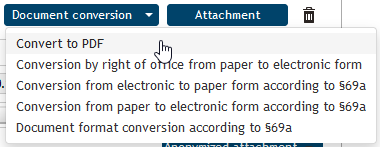
Most document manipulation is intended for the PDF format. If you have a document in another common file format (for example plain text or Microsoft Office documents), you can convert it simply using Convert to PDF.
Other conversion options include authorized conversion. Authorized conversion is document conversion from electronic to paper form (or the other way around) and providing the result with a validation clause to prove it is identical to the original. Conversion is mostly used for data message attachments.
The validation clause contains the prescribed text, an identification number (including a barcode for a scanning device), security features, the number of sheets and, optionally, signatures. Other details include the place that issued the clause, issue date and the name and surname of the person who converted the document. You can check the validation clause in the central validation clause register (https://www.czechpoint.cz/overovacidolozky) by entering its identification number.
Note that authorized conversion is not a validation of the input document. The conversion only declares the fact that the input and output documents match and no change has been made to the output document.