FAS settings
To make FormFlow available to FormApps Server (a server that provides the forms' application logic and so allows access to them from any device), you need to visit the Software602 FormApps Server parameters screen (), check Using the FormApps Server is enabled and set up the following fields:
-
FormFlow entry point – FormFlow address where forms are available for download, if it differs from the default value. If not specified, the current FormFlow URL will be used.
-
Entry point of the FormApps Server – folder URL of the FormApps Server that will open the forms. If the FormApps Server is running on the same machine, a relative path can be used. If it runs anywhere else, an absolute path must be specified.
-
Address(es) of FormApps Server – list of addresses from which FormApps Server can access FormFlow. This setting can prevent access from an unauthorized address. If not specified, the address of FormApps Server request to FormFlow will not be checked.
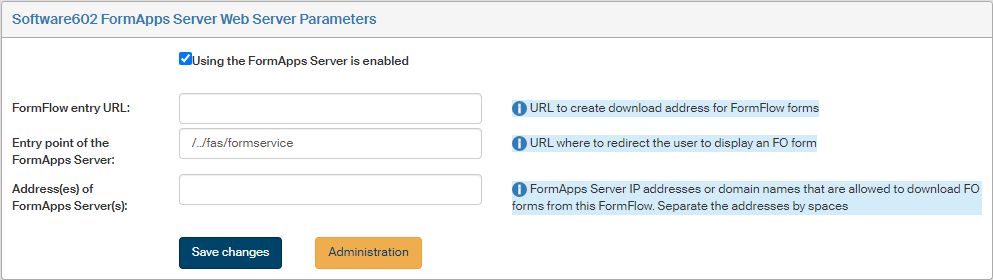
If the use of FAS is enabled, the button Open FAS administration is available to open an interface for FormApps Server administration. Its options are described in document "Software602 FormApps Server – Administration", which you can find in the installation zip file in folder \htdocs\FAS\.
You can also enter FormApps Server administration from outside FormFlow, if you log in (using the FAS administration access details) to
https://FAS domain/context/adminservice2/administration.