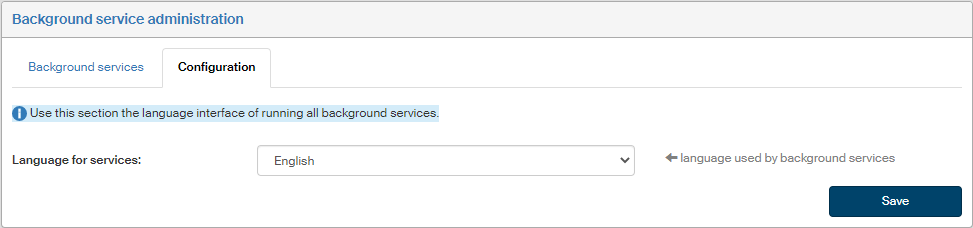
Background services
List of background services
The screen Background service administration () displays the list of all services that are run using 602js and perform maintenance in the background at preset times.
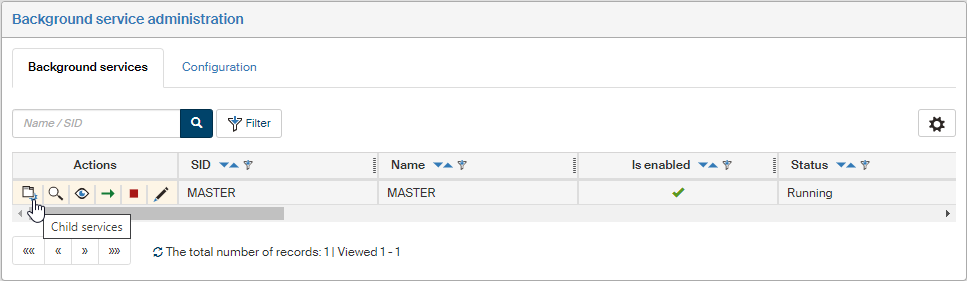
The services are displayed in a hierarchic order. The main list therefore only contains the MASTER service, which is the parent service to all the others. This service manages all other background services and if they are stopped, it will start them again. Display all other services by clicking  Child services in the Actions column.
If you place the mouse cursor over the title, a tooltip with details of the service will be displayed.

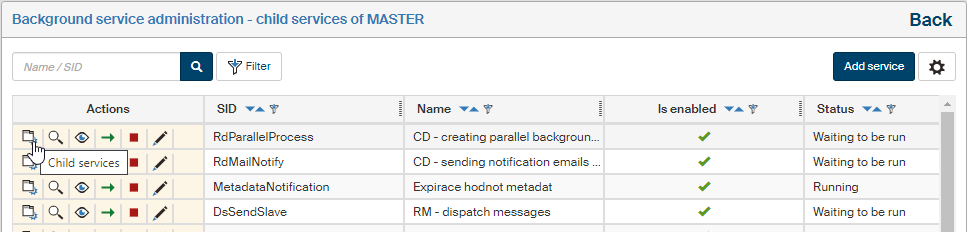
Child services may (but not necessarily) have their own child services. If you display a list of services run by this child service, the screen title is an active element. If you place the mouse cursor over the title, a tooltip with details of the service will be displayed.
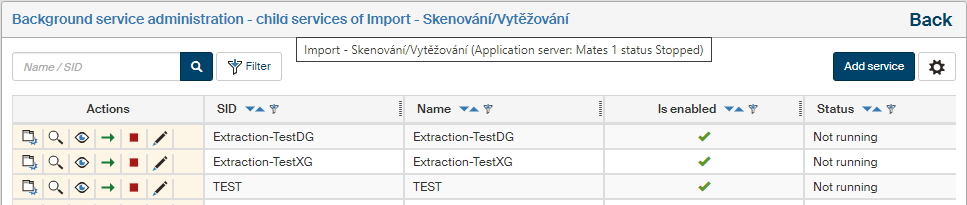
In addition to basic details, the list of services contains the Actions column, which offers the following functions for each service:
-
Child services – displays the list of child services to the given service. E.g. the MASTER service has all other services listed as its child services. You can create additional child services under Import – Scanning/Extraction.
-
 Service detail – displays the PID of the running process and a description of what is happening in the background.
 -
 Disable service /
  Enable service – disables or enables running the service.
 -
 Run now – runs the service immediately, regardless of preset intervals. For enabled services only. This action requires that the section Servers specifies in its settings the server where the FormFlow application server is located – the one where the IIS server is running.
 -
 Stop service – stops the running service.
 -
 Enable service runs – if the service has been stopped, it will run it again.
 -
 Edit service – displays a dialog window where you can edit service details or run the service immediately.
 -
 Delete service – removes the service from the list of background services. The MASTER service and FormFlow system services cannot be deleted.
New service and service properties
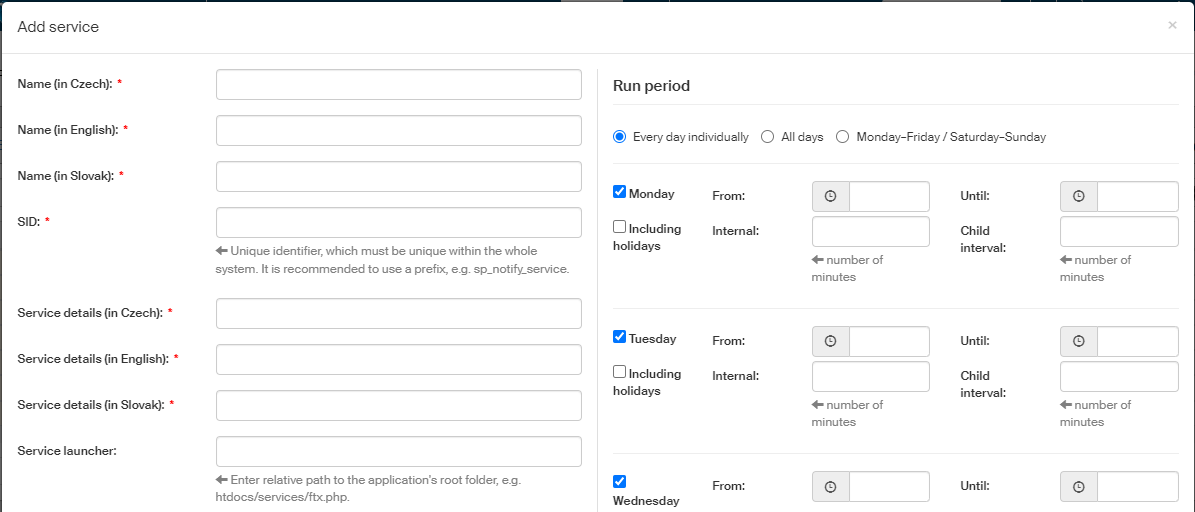
You can add a new service of your choice to the list of background services. Click the button Add service, placed in the upper right corner, to display the dialog where you can set up its properties. The same dialog will be displayed if you click Edit service to change the settings for an existing service.
-
Name – service name in Czech, Slovak and English, you can name it e.g. after the launcher.
-
SID – unique service identifier.
-
Service details – the description can be used to better understand what the service does; there are three language versions again.
-
Service definition – set up exactly one of the following two items:
-
Service launcher – path to the PHP file where the service is defined.
-
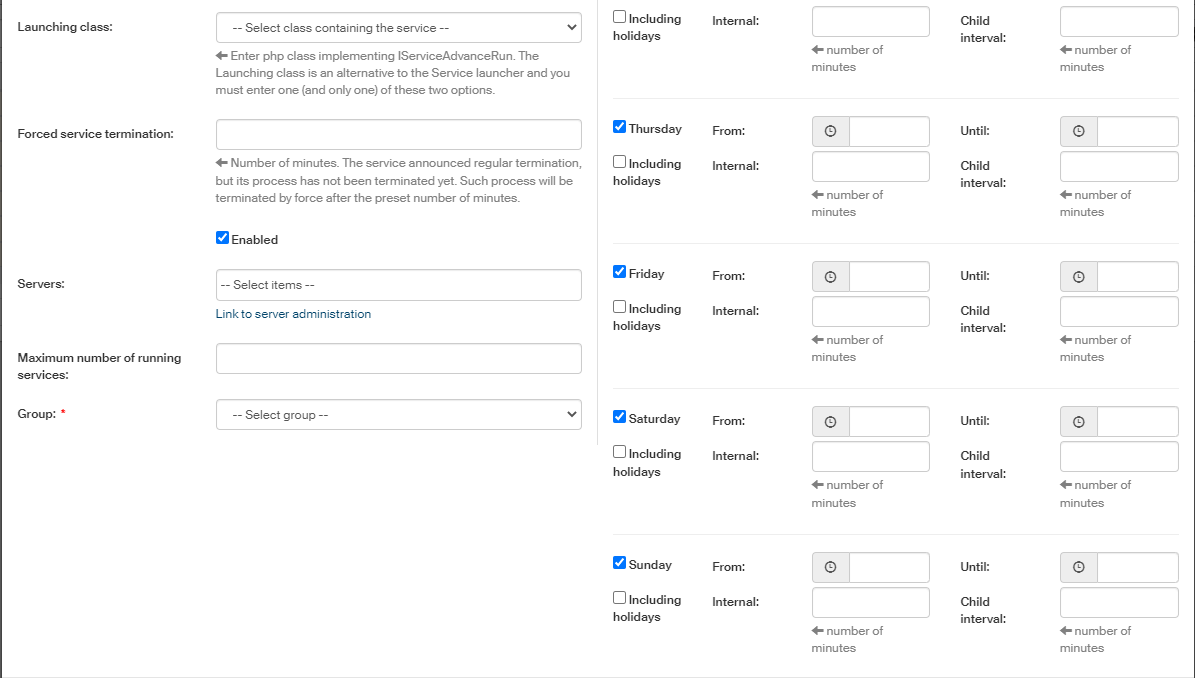
Launching class – select from the list a PHP class that contains the service.
-
-
Forced service termination – if the service has announced correct termination, but the process has not stopped, it will be force terminated after a given time. Use this field to set up the termination time, in minutes.
-
Enabled – if checked, the service will be run as scheduled.
-
Servers – select from the list of servers to add connections to other servers, for example if the background services will run on a server other than the FormFlow application server running on an IIS server.
-
If you display the section Run period, you can set up the exact days and hours when to run the service.
|
The screen does not display any default time values. The default setting for the Run period is Every day individually. To use the same time interval for each day, you can set the option to All days, fill in the required values and save. The next time the screen is displayed, the option Every day individually is selected again, but the above-mentioned (last saved) value is set to each of them. Now you can edit some of them and save again. If the field From is set to 00:00, the value START_SEDA = NULL is saved to the database. If Until is set to 23:59 (or 00:00), the value TS_END_SEDA=NULL is saved to the database. |
Individual service description
-
Master – this service manages all background services and if they are stopped, it will start them again. Service SID: MASTER. Script used by the service:
htdocs/services/serviceAdvance.php. -
ADDRESS BOOK – duplication search – the service is checking for contact duplications in the Address book. Service SID: Duplicity. Script used by the service:
htdocs/services/adresarDuplicity.php. -
Antivirus check – antivirus check for document attachments. Service SID: AntivirCheck. Script used by the service:
htdocs/services/AntivirCheck.php. -
LTD consistency check service (AIP) – checks for the existence of attachments referred to in AIP packages. Service SID: CheckAIPService. Script used by the service:
htdocs/services/am_checkAIP.php. -
LTD service Convert to PDF/A – qualified storage module service for long-term archiving of extracted attachments. Service SID: lta. Script used by the service:
htdocs/services/lta.php. -
LTD DMS document maintenance service – the service provides long-term maintenance of electronic signatures in DMS documents. Service SID: dg_ltd. Script used by the service:
htdocs/services/dg_ltd.php. -
LTD document maintenance service – the service provides long-term maintenance of electronic signatures in documents. Service SID: ltv. Script used by the service:
htdocs/services/ltv.php. -
LTD service creation of AIP packages – service that creates AIP packages for the forms where this feature is enabled (described in chapter Form detail). Service SID: AIPService. Script used by the service:
htdocs/services/am_ingest.php. -
ESS – automatic archiving of incoming documents – service that provides automatic archiving of incoming documents. Service SID: DsAutoClose. Script used by the service:
htdocs/services/DsAutoClose.php. -
RM – LTD maintenance of certificates of delivery – service that provides long-term maintenance of received certificates of receipt and certificates of delivery for data messages. Service SID: DsCheckLtvDelivery. Script used by the service:
htdocs/services/DsCheckLtvDelivery.php. -
ESS – hlídání načtení, odeslání a dlouhodobé údržby dokumentů – the service monitors the services that provide loading and submitting data messages and long-term preservation of documents. The check monitors the options of service log in and whether they ran in prescribed intervals. Service SID: DsWatchDog. Script used by the service:
htdocs/services/DsWatchDog.php. -
RM – directory checking – service that checks the address book to use with the Slovak data mailboxes. Service SID: DsCheckAddress. Script used by the service:
htdocs/services/DsCheckAddress.php. -
RM – check of sent data messages – service that checks whether data messages were submitted. Service SID: DsCheckSend. Script used by the service:
htdocs/services/DsCheckSend.php. -
RM – retrieve the list of data messages sent from the ISDS portal – service that loads the list of data messages sent from the DMIS portal. Service SID: DsReadSendByWebMaster. Script used by the service:
htdocs/services/DsReadSendByWebMaster.php. -
RM – retrieve a list of new data messages – service that loads the list of new data messages to be downloaded. Service SID: DsReadMaster. Script used by the service:
htdocs/services/DsReadMaster.php. -
RM – dispatch messages – service that submits messages using various channels (data messages, e-mail, paper mail). Service SID: DsSendSlave. Script used by the service:
htdocs/services/DsSendSlave.php. -
RM – notification e-mail sending – service that sends notification e-mails on upcoming deadlines. Service SID: DsMailNotify. Script used by the service:
htdocs/services/DsMailNotify.php. -
RM – preparing messages to send – service that prepares data messages to be submitted. Service SID: DsSendMaster. Script used by the service:
htdocs/services/DsSendMaster.php. -
RM – download data messages sent from the ISDS portal – service that downloads data messages submitted through the data mailbox portal. Service SID: DsReadSendByWebSlave. Script used by the service:
htdocs/services/DsReadSendByWebSlave.php. -
RM – download new data messages from the ISDS portal – service that downloads new data messages. Service SID: DsReadSlave. Script used by the service:
htdocs/services/DsReadSlave.php. -
RM – download new emails – service that downloads new e-mail messages and imports them in the records management system. Service SID: DsReadMail. Script used by the service:
htdocs/services/DsReadMail.php. -
RM – transaction log – service that select entries related to the records management system from the transaction log and archives them. The service creates a standardized record once a year and fills it with entries from the FormFlow transaction log. These entries are filtered so that only those related to records management will be placed in the record. The entries are placed in the record as separate XML files (e.g.: 2019-09-19_trans_log.xml) for each day. Every inserted XML file is provided with a qualified certificate and a time stamp. Service SID: DsTransLog. Script used by the service:
htdocs/services/DsTransLog.php. -
RM – creating tasks by scheduler – service that creates a task based on the message download/submitting scheduler. Service SID: DsSchedule. Script used by the service:
htdocs/services/DsSchedule.php. -
RM_SK – check of sent data messages – service used to check submitted data messages to the Slovak data mailbox system. Service SID: KsCheckSend. Script used by the service:
htdocs/services/KsCheckSend.php. -
RM_SK – retrieve a list of new data messages from the ÚPVS portal – service used to download a list of new Slovak data messages from the Slovak data mailbox system. Service SID: KsReadMaster. Script used by the service:
htdocs/services/KsReadMaster.php. -
RM_SK – download data messages sent from the ÚPVS portal – service used to download Slovak data messages sent from the Slovak data mailbox system. Service SID: KsReadSendByWebSlave. Script used by the service:
htdocs/services/KsReadSendByWebSlave.php. -
RM_SK – download new data messages from the ÚPVS portal – service used to download new Slovak data messages from the Slovak data mailbox system. Service SID: KsReadSlave. Script used by the service:
htdocs/services/KsReadSlave.php. -
Expiration on shared documents – service that monitors the validity period of document or process sharing and deletes expired sharing. Service SID: docSharing. Script used by the service:
htdocs/services/doc_sharing_expiration.php. -
Fulltext – service updating the data for fulltext search in forms, templates and documents. Service SID: fulltext. Script used by the service:
htdocs/services/ftx.php. -
General maintenance – service that removes old temporary binary files. Service SID: generalMain, Script used by the service:
htdocs/services/gm.php. -
Import – Scanning/Extraction – service that imports files from a selected folder structure to FormFlow. Service SID: Extraction. Script used by the service:
htdocs/services/extraction.php.There are several child services to this service:
-
Extraction-TestDG – extraction from DMS.
-
Extraction-TestXG – extraction from processes.
-
-
Import of attachments from processes in progress – service that downloads attachments from yet unfinished processes. Service SID: ufud. Script used by the service:
htdocs/services/ufud.php. -
Import of attachments from finished processes – service that imports attachments from finished form processes. Service SID: udat. Script used by the service:
htdocs/services/udat.php. -
Internal CA – service that runs internal certification authority processes. Service SID: ca. Script used by the service:
htdocs/services/ca.php. -
Check the deadline for processing the process – the service checks deadlines for processing forms. Service SID: peg. Script used by the service:
htdocs/services/processing_expiration.php. -
Sending emails – the service sends prepared electronic mail in the intervals specified. Service SID: mailSender, Script used by the service:
htdocs/services/mail_sender.php. -
Deferred changes – the service processes deferred changes – activities with higher demands on system resources, too lengthy to be run immediately after they are requested. This category includes permission changes on a large number of forms. Service SID: rudc. Script used by the service:
htdocs/services/rudc.php. -
DMS document signature validation – the service checks whether signatures in DMS documents are valid. Service SID: dg_sigVerifier. Script used by the service:
htdocs/services/dg_sigVerifier.php. -
Process handover – the service is used to hand over processes in progress to another user. Service SID: dfml. Script used by the service:
htdocs/services/dfml.php. -
CD – give the new users a distribution process – the service forwards a distribution process to new users. Service SID: RdNewUserDD. Script used by the service:
htdocs/services/RdNewUserDD.php. -
CD – sending notification emails after the expiry of the prescribed deadlines – the service sends notification e-mail messages when deadlines expire. Service SID: RdMailNotify. Script used by the service:
htdocs/services/RdMailNotify.php. -
CD – sending notification emails before the expiry of the prescribed deadlines – the service sends notification e-mail messages when deadlines are about to expire. Service SID: RdExpirationNotify. Script used by the service:
htdocs/services/RdExpirationNotify.php. -
CD – creating parallel background processes – the service creates parallel background processes. Service SID: RdParallelProcess. Script used by the service:
htdocs/services/RdParallelProcess.php. -
Log rotation – every FormFlow creates log files. To avoid letting them grow too large (the sizes will differ based on the level of logged details), they can be rotated, which means a zip archive is created once every 24 hours and the log files are moved in it. This is what this service does. Service SID: LogRotate. Script used by the service:
htdocs/services/log.php. -
SCMainService – gets the data of processes running in Sofa and downloads files signed by them. Service SID: SCMainService. Script used by the service:
htdocs/services/SCMainService.php. -
Synchronizing users and groups – the service synchronizes users and groups with the eDirectory service. Service SID: Sync. Script used by the service:
htdocs/services/edsync.php. -
System service forced termination – this service terminates other services at specified time and in a controlled way. This method helps avoid situations when a service seems to be running, but in fact it is not responding. Service SID: KILLER.
-
System alert – the service generates e-mail messages with system alerts. Service SID: systemAlert. Script used by the service:
htdocs/services/system_alert.php -
Evaluation of representative – the service evaluates the substitute settings and sets substitute users to stand in for the duration of signing users' absence. Service SID: subst. Script used by the service:
htdocs/services/subst.php.
More details for the DsWatchDog service
The new DsWatchdog service (“watch dog” type of service) checks once a day if an unsent outgoing electronic message (E-mail, DMIS, UPVS) older than three days exists for a closed MSG_OUT form. This service notes for each MSG_OUT form that it has been checked (so it does not need to check it the next day). If the MSG_OUT form is reopened and finished again, the check flag is deleted and the service will recheck it the next day.
Apart from outgoing MSG_OUT messages the service also checks for data messages (both Czech and Slovak) that fail to download.
If the check service finds a message that matches the above-described criteria, it sends a notification e-mail (in Czech, Slovak and English) to the selected user (). This notification e-mail cannot be configured at .
Service statuses
The individual background services may switch between the following statuses:
-
Running → Waiting to be run→ Running
-
Running → Waiting to be stopped → Stopped
-
Running → Waiting to be stopped → Disabled
-
Waiting to be run → Running
-
Waiting to be run → Stopped
-
Waiting to be run → Disabled
-
Stopped → Waiting to be run → Running
-
Stopped → Disabled
-
Disabled → Waiting to be run → Running
-
Running → Not responding
-
Running → Waiting to be stopped → Not responding
More details on the statuses:
-
Running – the service process is running and has a PID assigned
-
Waiting to be run – the service is waiting to be run again at its specified run interval, or one of the actions Enable service runs or Enable service has been called. Typical service operation will switch between the statuses of Running → Waiting to be run → Running → Waiting to be run, etc.
-
Waiting to be stopped – the action Stop service has been called, the MASTER service has been stopped or the action Disable service has been called, if the service was previously in status Running → Waiting to be stopped.
-
Stopped – the service is not running and its runs are not enabled, the action Stop service has been called or the MASTER service has been stopped. This status is reached from the status Waiting to be run → Stopped or Waiting to be stopped → Stopped.
-
Disabled – the action Disable service has been called. This status is reached from the status Running → Waiting to be stopped → Disabled, or Waiting to be run → Disabled, or Stopped → Disabled.
-
Not responding – the service stopped responding, exceeded the interval of last reaction and changed the status from Running → Not responding or Running → Waiting to be stopped → Not responding.
-
Not running – the service has not started, even though its run interval has already passed.
When updating FormFlow, it is necessary to know that a service which was to change the status to STOP has already stopped running. A service may not be in the Running status when it has already performed its cycle and is waiting for the run interval, as it is now.