Users
The button Users on the ADMINISTRATION tab displays a list of operations to manage all settings related to users, their accounts and assigning them to groups and roles.
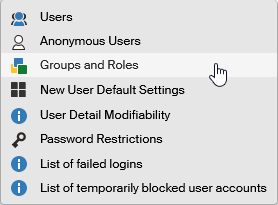
The list contains the following operations:
-
Users – user account management.
-
Anonymous users – allows some parts of FormFlow to be accessed by users who are not logged in, typically making some forms available to be filled out and submitted to FormFlow. The anonymous page is displayed when a user is not logged in.
-
Groups and roles – users can be organized into groups and roles to make management of their permissions and form workflow rules easier. Use this section to add, delete and edit groups and roles.
-
New user default settings – user account setting template, used when adding new users.
-
User detail modifiability – set which of user account settings can users modify themselves.
-
Password restrictions – set the requirements for user account passwords.
-
List of failed attempts at login using a password – list of failed logins: who, when and where attempted login using a password.
-
List of temporarily locked user accounts – list of user accounts currently blocked from logging in, because the number of failed attempts has been exceeded recently.