ERMS configuration
Open Settings and select the ERMS configuration entry to edit the general Electronic records management settings. See the next chapter for description of individual settings.
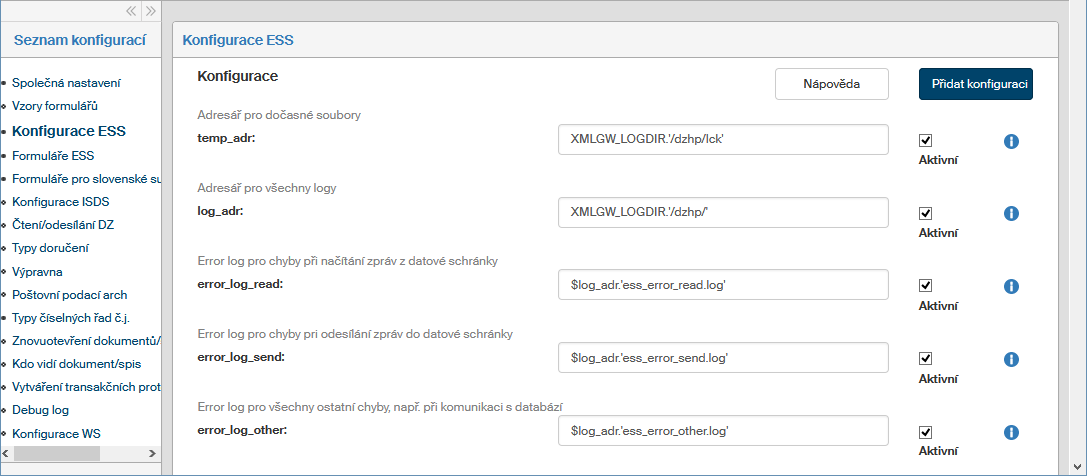
Edit them as needed and then click the Save button, located far below all configuration entries, to confirm the changes.
List of available configurations
Click the  next to any entry to display its description.
-
temp_adr
Folder for temporary files. Especially lock files (*.lck). This folder is created and set up automatically by the installer. Default value:XMLGW_LOGDIR.'/dzhp/lck', or use the define from FormFlow config.php:XMLGW_TEMP_DIR. -
log_adr
Folder for all logs (must end with a slash). This folder is created and set up automatically by the installer. Default value:XMLGW_LOGDIR.'/dzhp/'. Besides an absolute path, you can use the define from FormFlow config.php:XMLGW_LOGDIR -
error_log_read
Error log for recording errors encountered while downloading messages from a data mailbox. Default value:$log_adr.'ess_error_read.log' -
error_log_send
Error log for recording errors encountered while sending messages to a data mailbox. Default value:$log_adr.'ess_error_send.log' -
error_log_other
Error log for recording all other errors, e.g. during communication with the database. Default value:$log_adr.'ess_error_other.log' -
fms_read_send_log
Indicates whether to log events during downloading and sending data messages.
Values: will not be logged, will be logged (default) -
fms_read_log
Log file for recording events while downloading messages from a data mailbox. Default value:$log_adr.'ess_read.log' -
fms_send_log
Log file for recording events while sending messages to a data mailbox. Default value:$log_adr.'ess_send.log' -
fms_check_send_log
Log file for recording events while downloading the originals of sent data messages and certificate of delivery/receipt. Default value:$log_adr.'ess_check_send.log' -
fms_read_send_by_web_log
Log file for recording events while loading messages sent using the web interface. Default value:$log_adr.'ess_read_send_by_web.log' -
fms_read_mail_log
Log file for recording events while downloading messages from an e-mail account. Default value:$log_adr.'ess_read_mail.log' -
DZHP_ESS_LOG_NAME
Name of the general records management service log. The file is always placed in the folder set in the variable “log_adr”, a typical name is e.g.:'ess.log'. Default value: Log_name -
DZHP_CALLBACK_DISABLED
Option to disable all records management callbacks. Default value: 0.
0 = callbacks are enabled, 1 = callbacks are disabled. -
LOG_IP_ADDRESS
IP address logging in the history of document/file processing; the options are: not logging, logging. -
SEARCH_SUBJ_MAX_ITEM
Maximum number of items with found entries displayed in the autocomplete list; default value: 20. -
SPISOVKA_PRO
Records management modification for a specific client. -
SPISOVKA_NATION
National environment of the records management service for creating a file plan. CS = Czech entity, SK = Slovak entity. -
SPIS_PLAN_MODE
File plan mode: commerce = a new file plan code can be placed anywhere in the file plan structure, standard = a new file plan code can be only placed at the endpoints of the file plan structure -
skart_adr
Folder to store logs, lists and exports of shredded documents (not ending with a slash). Besides an absolute path, you can use the “log_adr” variable here, e.g.:$log_adr . '/shredding' -
DEFAULT_SKART_LHUTA
Retention period used for documents/files with no retention period set and no default retention period for their entity; default value: 10 -
CSV_DELIMITER
CSV file delimiter; default value: ‘;’ -
SKART_MAX_ZIP_LENGTH
Max. file size in a single ZIP file when exporting data for the National archive, in bytes; default value: 1000000 -
skart_finish_without_sign
Whether finishing the shredding procedure without an electronic signature is allowed; options: 0 = requires an electronic signature, 1 = does not require an electronic signature -
skart_SK
List of Czech entities (ID_CERT) that use Slovak legislation for retention/shredding. The SKART_SK form must be used. E.g. to use Slovak legislation for shredding with entities ID_CERT = 12 and 28, enter the following:array ( 0 => 12, 1 => 28, );
-
ADDRESS_BOOK_READ_ID_GROU
Members of this group can read from the local address book; enter the ID_GROU for the FormFlow user group. -
ADDRESS_BOOK_WRITE_ID_GROU
Members of this group can write in the local address book. Enter the ID_GROU for the FormFlow user group.
-
ESS_SIMPLE_CONTACT_CREATE
Simplified creation of a new address book contact from a document form. If the define is not enabled or is equal to 0, users must create the contact in the address book first.
If the define is enabled and equal to 1, users can create a new address book contact directly from a document’s form. -
time_alive_takeover_token
Validity period for the token created by the mail room to hand over physical documents. If the value is not set or is disabled, the default value 900 seconds (15 minutes) will be used. The validity period is in seconds and the typical value is e.g.: 1800 (30 minutes) -
DZHP_IDENTIFY_REQUEST_TTL
Validity period setting for an identify request. The value is in seconds; if not set, the identify request loses validity immediately. When this period expires, it is not possible to work with the form. To provide infinite validity period, disable this configuration parameter. -
XMLGW_DZHP_MODULE_NAME
Name of records management module for writing in the transaction log. The typical value is:'ESS'. -
DZHP_HTML_ANSWER_WINDOW_WIDTH
The size of a response window. The value is in pixels, typically e.g.: 500 -
DZHP_HTML_ANSWER_WINDOW_HEIGHT
The size of a response window. The value is in pixels, typically e.g.: 150 -
ESS_VIEW_ONLY_SPIS_WITH_RIGHT
An option to only display the records for which the user has permissions (value 1). If the value is 0 or not set, all records will be displayed. -
SET_NEW_DATE_CLOSE_AFTER_REOPEN_MSG
Processing date that will be set after a reopened document is finished. The default value is 0. Available values: 0 = the processing date will be the same as after the first processing, 1 = the document will receive a new processing date -
WAIT_FOR_DELIVERY_LTV_ACCEPT
Number of days to wait for a certificate of receipt, until starting to long-term preserve the certificate of delivery. The value is in days and a typical value is e.g.: 20. The default value is 9The default value is 90 days. -
post_arch_max_records
Maximum number of records that can be loaded in the POST_ARCH (bulk posting) form. The typical value is e.g.: 50. To place more than 50 recipients in a bulk posting form, you will need to raise this value. -
USE_SUBSTITUTE_FOR_COPY_DOCUMENT
Option to use a deputy when creating document copies. The default value is 0. Available values: 1 = allows to use a deputy when creating document copies, 0 = does not allow -
dont_replace_template_after_reopen
Option to disable replacing the form with a new form template when reopening the form. The default value is 0.
1 = use of a new form template when reopening is disabled, 0 = it is enabled -
NUM_SIGNS_OLD_MSG_IN
Number of electronic signatures there were in the old, version 6 MSG_IN form when installed in FF, now being converted to version 10. You can enter the value 2 or 3 -
NUM_SIGNS_OLD_MSG_OUT
Number of electronic signatures there were in the old, version 6 MSG_OUT form when installed in FF, now being converted to version 10. You can enter the value 2 or 3 -
NUM_SIGNS_OLD_SPIS
Number of electronic signatures there were in the old, version 6 SPIS form when installed in FF, now being converted to version 10. You can enter the value 2 or 3 -
apx_link_url_redirect
Change of URL links to storage in the form. If the storage URL has changed, you can use this variable to change the URL in links to the storage in forms. E.g. To changehttps://192.168.1.34/tohttps://records.company.com/, enter the following:array ( 'http://192.168.1.34/' => 'https://records.company.com/', );
-
error_read_send_mail
Whether to send an e-mail with an error message while loading or sending messages. You can disable sending error notification e-mails here, but typically sending notification e-mails is always enabled. Options: e-mails will be sent, e-mails will not be sent. -
error_mail_address
E-mail with any error will be sent, besides the task supervisor, also to all e-mail addresses from the following list. If you need to send error notifications to addressesadmin2@602.czandadmin3@602.cz, enter the following:array ( 0 => 'admin2@602.cz', 1 => 'admin3@602.cz' );
-
modify_delivery_classic_after_reopen
You can select entities here who want to modify the dates of sending (or receiving) paper mail that was sent earlier after reopening and the MSG_OUT type form and sending it again to the mail room. If you need to use these properties for entities with ID: 5, 12 and 28, then enter the following:array (5, 12, 28);
-
DONT_ASSIGN_CJ
Disables automatic reference number assignment at the mail room – incoming e-mail and data messages will not be automatically assigned a reference number when they arrive at the mail room.
The default value is 0.
If the define is not enabled or the value is 0, automatic reference number assignment at the mail room is enabled.
If the define is enabled and the value is 1, automatic assignment of a reference number will be disabled. -
MOVE_ALL_TO_ARCHIVE_AFTER_CLOSE
Moving documents/records in the archive immediately after finishing.
If the define is not enabled or equal to 0, users must click the "Archive" button in a document/record form to move the document/record to the archive.
If the define is enabled and equal to 1, a document/record is moved to the archive automatically when finished. -
DOKUMENT_VE_VICERO_SPISECH
The option to insert one document in more than one record.
If the define is not enabled or is equal to 0, each document can only be placed in a single record.
If the define is enabled and equal to 1, a document can be placed in more than one record. -
DZHP_MAIL_AUTOANSWER_DELAY
The interval (in minutes) in which FormFlow will not send an automatic e-mail reply to another incoming e-mail from the same e-mail address.
The interval can be set between 5 minutes and 1440 minutes (24 hours). -
DZHP_BIG_FILE_LIMIT_MB
Limit in MB to define large attachments: the form handles large attachments differently.
The limit can be set between 1 MB and 1073 MB.
Only applies to forms created from templates that are adapted to handle large attachments. -
dzhp_TYP
Indicates the record creation type (document linking or collection sheet). Not in use anymore. -
dzhp_NATION
Indicates whether the records management service is Czech or Slovak. Not in use anymore.
| Starting with version 10.2.4, shredding is performed using an HTML form; as a result, it is not needed to maintain or install a shredding form template. |
Adding a new configuration
If you are missing a configuration entry from the list, you can add it. Click the Add configuration button in the upper right corner of the screen. The dialog Add configuration is displayed.
-
Enter the Variable name and Variable value.
-
Select the Variable type from the list, the options are the following: Variable, Define and Array.
-
If you check Enabled, the configuration entry will be applied when saved.
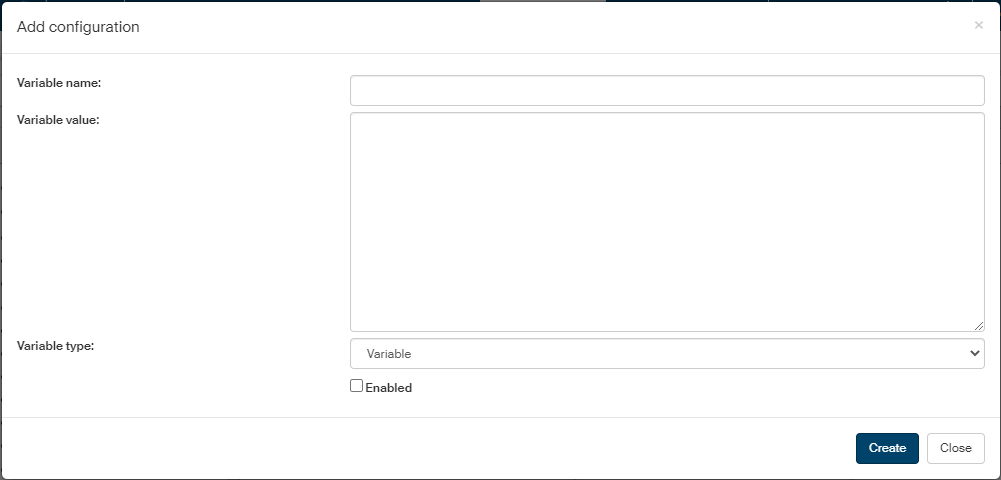
Click Create to confirm creating the configuration entry.