Unique identifier UID
The law requires documents to have a unique identifier to distinguish it from others. It is possible to set up the UID individually for each entity and specify the elements that compose the UID (entity identifier, order number in a specific format). There are macros you can use in the UID mask.
On the left panel in the Entities screen (), make sure the entity you want to edit is selected in the Entities list. Then go to Menu and click UID. The screen UID (entity name) is displayed on the right. Set up how to compose the UID for the entity in this screen.
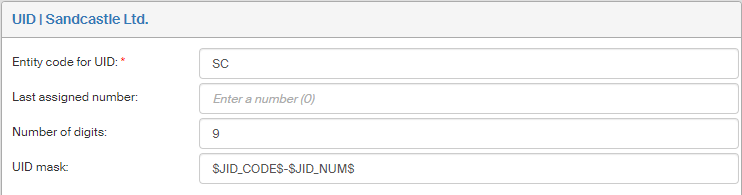
The following controls are available:
-
In field Subject code for UID, enter a string that will identify the entity and will be used in UID settings.
-
The field Last assigned number is read-only and displays the latest UID number used in a process. The default value set after Records management installation is 0.
-
Enter the number of digits for the order number in Number of digits – leading zeros will be added to lower numbers to reach the required number of digits.
Example: If the last assigned number is e.g. 63 and the number of digits is set to 9, the number will be displayed in the form as 000000063. -
UID mask specifies how to compose the identification string used in MSG_IN and MSG_OUT forms. Typical macros used to compose the string are $JID_CODE$ - $JID_NUM$. A macro is, in this example, inserting the Entity code in UID and Number of digits in the string. You can enter any text in the field and combine it with the macros.
When you have entered the details, click Save changes to confirm them. Click Discard changes to remove any unsaved changes from the UID settings.
The Delete UID button is unavailable (grayed out) if the UID is already used in a form. If it has not been used yet, you can click the button to delete the UID.