FormFlow system configuration
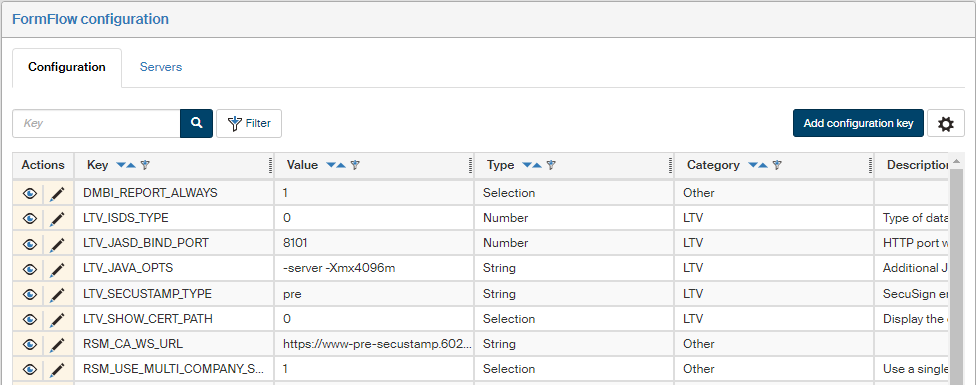
Use the FormFlow configuration screen () to edit selected server configuration settings. Some settings can be only set directly in configuration files.
Use the button  placed on the right above the table to display the filtering and sorting limits for this list. The settings are described in more detail in chapter Grid administration.
Disabling and enabling configuration
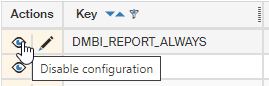
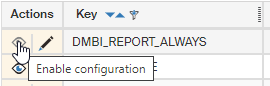
A set configuration can be temporarily disabled and re-enabled as needed. Use the button Disable configuration / Enable configuration in the Actions column to switch between the two options.
Editing and adding configuration keys
To change an existing configuration key, go to the Actions column and click  Edit configuration key.
In the dialog Edit configuration key, edit the details or add them and then click Save to confirm the changes.
Edit configuration key.
In the dialog Edit configuration key, edit the details or add them and then click Save to confirm the changes.
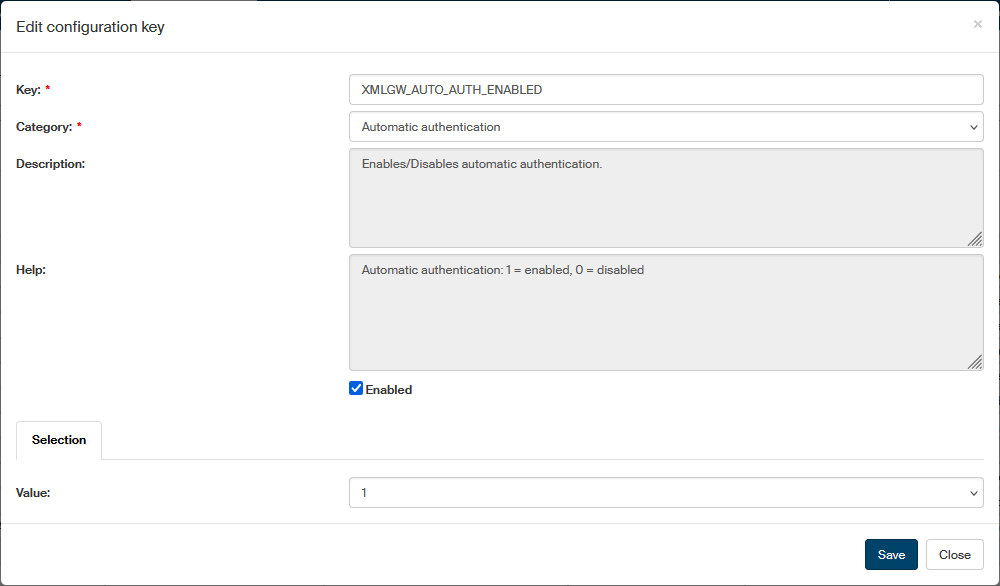
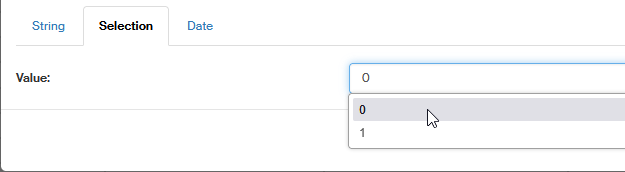
Click the button Add configuration key to insert a new entry. A dialog similar to the editing one is displayed. Enter the details needed, especially the name (Key) and category. For Value, you can select one of the tabs specifying the type of value that will be placed in the key.
Automatic authentication
- XMLGW_AUTH_SYNC
-
Set to TRUE to enable user authentication using LDAP. The FormFlow login page will be displayed, but users will be authenticated using LDAP. The user must be synchronized. It can only be used for synchronization with Active Directory. The default value is TRUE.
- XMLGW_AUTO_AUTH_ENABLED
-
Enables/disables automatic authentication.
- XMLGW_AUTO_AUTH_FUNCTION
-
PHP function that returns the name of automatically authenticated user, if XMLGW_AUTO_AUTH_INVOCATION is set to
function. - XMLGW_AUTO_AUTH_INVOCATION
-
Automatic authentication type. Allowed values are:
direct,redirect,function. - XMLGW_AUTO_AUTH_LOGIN_DIALOG_ENABLED
-
Hidden switch to enable URL variable
show_dialog, which can be passed to the PHP scriptlogin.phpwith the value of1. - XMLGW_AUTO_AUTH_PERMIT_RELOGIN
-
Allowed values are
0,1, or2:-
0– users can only authenticate using automatic authentication, which means the FormFlow login dialog will never be displayed. -
1– users can relogin to another FormFlow user after being logged in using automatic authentication; this means the FormFlow login dialog is displayed after a user logs out. -
2– users can log in any time, which means that the FormFlow login dialog is displayed every time a user wants to log in to FormFlow; they can choose whether to log in using automatic authentication or by entering a username and a password.
-
- XMLGW_AUTO_AUTH_URL
-
Methods of login using automatic authentication. This define can have the following values:
-
602id– login using 602ID, -
./sso/auth602fs.php– login using SSO, -
./saml/skdatovka/index.php– an example login using SAML, -
/ffs/index.php?action=dialog&do=login-open&presenter=OAuth%3AGoogle– Google Authentication; must contain the exact FormFlow address, -
http://www.server.com/some/script.ext– other authentication method. Specify the path to an authentication script.
-
- XMLGW_SYNC_NAME_CHANGE_CLASS
-
Name with namespace for the class that changes synchronization attributes.
- XMLGW_SYNC_REQCERT
-
Specifies whether and how to take certificates for LDAPS connection. This constant sets the type of connection. The options are
never,allow,tryanddemand.
OpenSearch
- XMLGW_ELASTIC_HOSTS
-
IP address or URL, where OpenSearch, the fulltext search service, responds. A port can also be specified. If not set, fulltext search in FormFlow will be hidden from the users.
The field can have the following values:
-
192.168.1.1:9200– IP + port -
192.168.1.2– IP only -
mydomain.server.com:9201– domain + port -
mydomain2.server.com– domain only -
https://localhost– SSL to localhost -
https://192.168.1.3:9200– SSL to IP + port
-
- XMLGW_ELASTIC_LOG_LEVEL
-
Logging level, the field can have the following values:
-
DEBUG:
100 -
INFO:
200 -
NOTICE:
250 -
WARNING:
300 -
ERROR:
400 -
CRITICAL:
500 -
ALERT:
550 -
EMERGENCY:
600
-
- XMLGW_ELASTIC_USERNAME
-
Username to log in to OpenSearch.
- XMLGW_ELASTIC_PASSWORD_HASH
-
Hash of the password to log in to OpenSearch.
External authentication
- XMLGW_EXTERNAL_AUTH_ENABLED
-
Enables/disables automatic authentication.
- XMLGW_EXTERNAL_AUTH_FILENAME
-
Relative path to file with PHP function that performs external authentication. The path must be relative to the folder containing file
htdocs/config.php. - XMLGW_EXTERNAL_AUTH_FUNCTION
-
Name of the PHP function that performs external authentication. The function must have the header
function (string $login, string $password)and must returntrue, if the supplied$loginand$passwordare correct, orfalse, if they are incorrect. The constant that contains the function to be used for logging in. E.g.:xmlfs_external_auth.
HTTP client settings
The CAfile.crt file contains a list of counterparties' trusted certification authorities, which FF checks during client HTTPS communication.
It is very important to add the root and all intermediate certificates of the certification authority that issued the HTTPS certificate.
Example of certificate import to CAfile.crt:
openssl x509 -in base64.cer -text >> CAfile.crt
The following example shows how to test an OpenSSL connection:
openssl s_client -connect ffs.server.cz:443 -servername ffs.server.cz –showcerts
If the connection is successful, a message similar to the following is included in the result:
SSL handshake has read 2111 bytes and written 503 bytes
Configuration keys:
- XMLGW_CURL_VERBOSE
-
Write debug messages from CURL library to the standard output.
- XMLGW_CURL_CONNECTTIMEOUT
-
Maximum time in seconds to establish HTTP connection.
- XMLGW_CURL_TIMEOUT
-
Maximum time in seconds to process HTTP request.
- XMLGW_CURL_VERBOSE_TO_LOG
-
Write debug messages from CURL library to the error output.
Such output may contain authentication data. - XMLGW_SSL_VERIFY_DISABLE
-
Disable counterparty certificate validation in HTTP SSL/TLS communication.
- XMLGW_SSL_VERIFY_CAFILE
-
Path to
CAfile.crtthat stores authority certificates.
Proxy settings:
- XMLGW_NOPROXY
-
List of addresses for which HTTP Proxy will not be used.
- XMLGW_PROXY_HOST
-
If not set, there will be no outgoing HTTP communication through a proxy.
- XMLGW_PROXY_PORT
-
HTTP Proxy port.
- XMLGW_PROXY_USER
-
Login name for HTTP Proxy authentication.
- XMLGW_PROXY_PASS
-
Password for HTTP Proxy authentication.
Logging
Logging settings are only available in file config.php.
- XMLGW_ENBLED_LOGSQL_TOTAL_LONG_SQL
-
Logging all lengthy queries.
- XMLGW_ERRLOG_STACK
-
Writing the stack to the log. Can be set to several levels, the default value is
40. Levels:-
0– nothing is logged. -
10– only errors are logged. -
20– errors and warnings are logged. -
30– notices, errors and warnings. -
40– info, notices, errors and warnings. -
50– traces, info, notices, errors and warnings. -
60– traces, info, notices, errors and warnings. -
61– all previous log levels are displayed, as well as SQL queries and their times.
-
- XMLGW_LOG_API
-
Enables time logging for functions.
- XMLGW_LOGDIR
-
The folders where to create log files.
Default value:XMLGW_ROOT.'/logs' - XMLGW_LOGFILE_LOGLEVEL
-
Log level setting for the file that catches log reports. Levels:
-
60– debug. -
64- SQL query with shortened parameters. -
67- SQL query with base64-encoded parameters.
-
- XMLGW_LOGSQL_EVERY_TIME
-
Logging all SQL queries.
- XMLGW_LOGSQL_LONG_SQL
-
Limit in ms for logging lengthy SQL queries.
- XMLGW_LOGSQL_TOTAL_LONG_SQL
-
Limit v ms for logging lengthy requests.
- XMLGW_NAME
-
Base logfile name.
Default value:FFS - XMLGW_SERVICE_LOGFILE_LOGLEVEL
-
Log level setting for the service file that catches log reports. Can be set to several levels, the default value is
40. Levels:-
60– debug. -
64- SQL query with shortened parameters. -
67- SQL query with base64-encoded parameters.
-
- XMLGW_CSV_LOG_WS_CLIENT
-
Write web service client processing into a csv log.
- XMLGW_CSV_LOG_WS_SERVER
-
Write web service processing into a csv log.
Long-Term Docs
- SVC602LTV_ACCEPTABLE_AUTHORITY_TYPES
-
Types of authorities for which
Service602LTV.ltvAnalyzereturns positive validation. Enter as a comma-separated list (,), the values available areQUALIFIED,COMMERCIAL,INTERNAL. If the list is empty, all authority types are accepted. - SVC602LTV_SKIP_CERT_PATH_IN_RESPONSE
-
Service602LTVinltvAnalyzeResponsewill not return the contents of/LtvAnalyzeResponse/sigInfos/sigInfo/certPath. - SVC602LTV_SKIP_CRL_IN_RESPONSE
-
Service602LTVinltvAnalyzeResponsewill not return the contents of/LtvAnalyzeResponse/sigInfos/sigInfo/crlPath. - SVC602LTV_TIMESTAMP_SERVICE_RETRY
-
Length of time in ms, for which the service waits between repeating calls of the time-stamping service. The separator is a comma (
,). The number of entries is the maximum number of repeats.
Default value:300,500,1000,1500,2000 - SVC602LTV_TRANSLATE_WARNING
-
Service602LTVinltvAnalyzeResponsewill returnPREVALIDATEDinstead ofWARNING.
Qualified storage
Configuration keys related to qualified storage are placed under the Long-Term Docs category.
- LTV_ALLOW_OOXML
-
Support MS Office and LibreOffice documents when processing in qualified storage.
- LTV_DBG_DONT_RM
-
Whether to clean up data after communicating with the java submodule jas:
-
0– clean up data; -
1– do not clean up data.
-
- LTV_GIVE_UP_FAILED_TEMP_SEC
-
Length of time after which a temporarily failing operation will be considered permanently failed.
In seconds, the default value is7776000, which is 90 days. - LTV_GRACE_PERIOD_SEC
-
Grace period in seconds. When the grace period passes, it can be trusted whether the CRL list contains certificate revocation information.
The default value is86400, which is 24 hours. Changing this value is meant for debugging only. - LTV_HEAD_OPS_INTERVAL_SEC
-
How often to run main operations, in seconds.
The default value is3600, which is 1 hour. - LTV_ISDS_TYPE
-
Data mailbox environment type for data message reauthorization.
- LTV_SECUSTAMP_TYPE
-
SecuSign environment type. Available values:
-
PROD – production (live) environment.
-
PRE – public test.
-
- LTV_JASD_BIND_HOST
-
HTTP name of the host where the jas submodule will be listening.
- LTV_JASD_BIND_PORT
-
HTTP port where the jas submodule will be listening.
- LTV_JASW_URL
-
URL of the jas module run on Apache Tomcat.
- LTV_JAVA_OPTS
-
Additional JVM parameters for the jas submodule. Specific parameters can be found in the help for JVM parameters.
- LTV_MAX_WAITFOR_JASD_SECONDS
-
How long to wait for the jas submodule to start, in seconds.
Default value:60 - LTV_LOG_UNMATCHED_IDS_FOR_UPDATE
-
Log unknown
id_sdarwhen callinggetForUpdate. - LTV_MAX_REGISTER_COUNT
-
Maximum number of attempts to register a document.
The default value is3. - LTV_MIN_UPDATE_DAYS
-
Minimum number of days between the registration and maintenance or between maintenances.
The default value is360days. - LTV_PING_INTERVAL_SEC
-
How often to test connection to SecuSign, in seconds.
- LTV_PING_FAILED_MAIL_ALERT_SEC
-
Length of time in seconds after which an email notification is sent that SecuSign services are unreachable.
The default value is14400, which is 4 hours. - LTV_RETRY_SEC
-
How long to wait, in seconds, before repeating an operation that temporarily failed.
The default value is43200, which is 12 hours. - LTV_SERVICE_MAX_MEM_RATIO
-
Percentage of memory used for the service process that will make the service voluntarily stop and wait for the next run. Real number, for example
0.7. - LTV_SFLF_WRITE_TEST_INTERVAL_SEC
-
How often to test writing in the SFLF store.
The default value is1800, which is 30 minutes. - LTV_SFLF_WRITE_TEST_SIZE
-
The size of test file when testing writing in the SFLF store.
The default value is52428800, which is 50 MB. - LTV_SHOW_CERT_PATH
-
Display the certification path of the signature certificate in the validation results.
- LTV_STEP
-
Number of
xg_udatentries to prepare for LTA processing. - LTV_UNREGISTER_STEP
-
Number of unregistrations to run at one time.
Sofa konektor
These configuration keys are used to set up the Sofa connector.
- SOFA_CONNECTOR_AGENDA_SETTINGS
-
Settings for the Sofa processes.
Example:{"sofaSignPointFilled":{"agendaIdent":"SignPoint_FFS","messageIdent":"sys_obecna_dms_zprava","messageIdent2":"sys_instance"},"sofaSignPointBasic":{"agendaIdent":"SignPoint_API_start","messageIdent":"sys_start_template","messageIdent2":"sys_instance"}} - SOFA_CONNECTOR_CUSTOM_AGENDA
-
Settings for customized Sofa processes.
- SOFA_CONNECTOR_ENCRYPTED_PASS
-
Encrypted Sofa password.
- SOFA_CONNECTOR_LOGIN
-
Sofa username.
- SOFA_CONNECTOR_MAX_ATTACHMENT_SIZE
-
Maximum size [B] of a single attachment in Sofa.
- SOFA_CONNECTOR_SIGNPOINT_PREFERENCE
-
Preference for filling out the SignPoint process in Sofa.
-
filled– fill out in FormFlow, -
basic– fill out in Sofa.
-
- SOFA_CONNECTOR_URL
-
Sofa base URL.
Example:https://testsofa.602.cz - SOFA_CONNECTOR_USER_ENUM_GRP_IDENT
-
The identifier of a group of users in Sofa that will be returned to code lists.
Example:Signors - SOFA_CONNECTOR_USER_IDENT
-
User identifier in Sofa.
Nagios check
- XMLGW_STP_DISC_SPACE_LEVEL_ERROR
-
Level of empty disk space to signal an error, in GB.
- XMLGW_STP_DISC_SPACE_LEVEL_WARNING
-
Level of empty disk space to signal a warning, in GB.
- XMLGW_STP_CHECK_CERTIFICATES
-
Check the status of certificates.
- XMLGW_STP_CHECK_DB_SCHEMA
-
Check the database schema.
- XMLGW_STP_CHECK_DISC_SPACE
-
Check for disk space.
- XMLGW_STP_CHECK_DS
-
Check data mailboxes.
- XMLGW_STP_CHECK_ES
-
Check Slovak electronic mailboxes.
- XMLGW_STP_CHECK_FAS
-
Check FAS availability.
- XMLGW_STP_CHECK_MASTER_SERVICE
-
Check the status of the Master service.
- XMLGW_STP_CHECK_SECUSIGN_SDK
-
Check the availability of SecuSign SDK and document conversion using Long-Term Docs SDK.
- XMLGW_STP_CHECK_SERVICES
-
Check the status of child services.
- XMLGW_STP_CHECK_SFLF
-
Check the availability of SFLF.
Other
- DOCUMENTS_MERGE_TOOL_TIMEOUT
-
Length of time in seconds, how long to wait for merging documents in a single PDF document.
The default value is300seconds. - DOCUMENTS_MERGE_TOOL_TIMEOUT_ONLY_FAILOVER
-
-
true– only merging that times out will be replaced with a substitute ZIP file. -
false– all failed calls will be replaced with a substitute ZIP file.
The default value is
true. -
- GRID_BULKACTION_REQUEST_DELAY
-
Delay of the right-hand panel on a grid when bulk selecting, in milliseconds.
- GRID_COUNT_CACHE_ROWS
-
Sets whether to run SQL count to get the number of rows in grid cache.
- GRID_DG_LOAD_FIRST_EMPTY_PAGE
-
In document section, sets whether to always load the first empty page after arriving from the ribbon or from a folder link.
- GRID_EXPORT_ASYNC_EXECUTION_TIMEOUT
-
Length of time in seconds, how long to wait for asynchronous export.
The default value is86400, which is 24 hours. - GRID_EXPORT_DELETION_DAYS
-
Length of time in days, after which old exports will be deleted.
- JAVA_HOME
-
Path to Java folder.
- RENAME_FILE_TYPES_ON_DOWNLOAD
-
Files of these types will always receive the .txt extension on download, to prevent them from being run automatically. If this configuration is empty, no changes are made.
Example:htm,html,js,js2,json,json2,svg,xml,php,asp,aspx,jsp,py,ps1,bat,exe,exe2,exe3,com,msi - RSM_DISABLE_PIN_VERIFICATION
-
Skip certificate PIN check before signing.
- RSM_CHECK_CERTS_STATE
-
Interval in seconds between checks of certificate status in table XG_RCER in the General Maintanance service.
- RSM_CHECK_CERTS_STATE_FROM_HSM
-
Interval in seconds between reloading the list of user’s certificates in the General Maintanance service using HSM_WS.
- RSM_RCER_RELOAD_FROM_HSM
-
Interval in seconds between reloading the certificate list using HSM_WS.
- RSM_RCER_STATE_REFRESH_INTERVAL
-
Interval in seconds between refreshing the status of XG_RCER.STATE_RCER.
- RSM_RREQ_STATE_REFRESH_INTERVAL
-
Interval in seconds between refreshing the status of XG_RREQ.STATE_RREQ.
- RSM_SHOW_RENEW_IN_DAYS
-
Number of days before expiry when the operation to issue certificate renewal is displayed.
- RSM_USE_AAD_OBJECT_ID_AS_CERT_ID
-
Specifies whether to use Object ID from EntraID (Azure Active Directory) to identify a certificate stored in HSM. When used, the entity code is sent; the code can be found in the GUI at the following path: Administration > Records management > Entity > Entity details > Entity code.
- RSM_TOKEN_CHECK_SRC_IP
-
Check client IP address when using a token for authentication.
- RSM_TOKEN_TIMEOUT
-
RSM token expiry time, in seconds.
- RSM_USE_AAD_ADP
-
-
If false (
0), AD# is used.
AD#[ObjectGUID] is used when Sofa is synchronized directly with Entra ID. -
If true (
1), ADP# is used.
ADP#[base64form_Of_AD_ObjectGUID] is used when on-premises AD is synchronized with Entra ID using Entra ID Connect. This setting is more common.
-
- RSM_SLEEP_BETWEEN_LIST_CERTS
-
Number of seconds to wait before the next background service call to get a list of certificates.
The default value is43600, which is 12 hours. - RSM_USE_INT_WS
-
Use rsmint.secusign.cz or its non-production versions.
- RSM_USE_MULTI_COMPANY_SOFTCARD
-
Use a single softcard in HSM for all subjects using the remote signing services.
- SIBA_ASYNC_EXECUTION_TIMEOUT
-
Length of time in seconds, how long to wait for the completion of asynchronous signing batch from the right-hand panel.
The default value is1800seconds. - SIBA_SIGNER_FORM_DOCUMENT_PAGE_SIZE
-
Number of documents signed at one time in a FAS form using Signer.
- XMLGW_ALLOW_FINISHED_DOCUMENT_FILE_MODIFICATION
-
-
true (
1) – modifying a finished document is allowed. -
false (
0) – modifying a finished document is not allowed.
The default value is false (
0). -
- XMLGW_AM_GRACE_PERIOD
-
Interval in seconds before retrying to create an AIP package.
- XMLGW_AM_PAGE_SIZE
-
Number of AIP packages created in one cycle.
- XMLGW_AUTH_IGNORE_WINDOWS_DOMAIN
-
If
true(default), user’s domain will not be compared during authentication with the domain of the server where the FormFlow instance is running. - XMLGW_DEFER_SFLF_DELETION
-
Defer deletion of binary files in SFLF made by rewriting the binary of a document version. The deletion itself is handled by SdelService.
- XMLGW_DEFER_SFLF_DELETION_DAYS
-
Period in days before old SFLF files are deleted.
The default value is1825days, which is 5 years. - XMLGW_DG_WS_ACCEPT_VIRTUAL_METADATA
-
Accept and translate CODE_STAT_DOCU, CODE_RANK_DOCU and CODE_CLAS_DOCU in ServiceDG with their equivalents ID_*.
- XMLGW_DG_WS_GET_DOCUMENT_REQ_DB_META
-
In GetDocument, return the values of
dbtable_metaanddbcolumn_meta. - XMLGW_DOCUMENTS_MERGE_TOOL
-
Path to
concat.exefor merging PDF documents. - XMLGW_EXECUTE_RUFR_CHANGES_IMMEDIATELY
-
Switch that specifies whether to apply changes in row-based form permissions immediately or note them and execute later using a background service.
- XMLGW_FORM_ENABLED_UPDATE_ATTACHMENTS
-
A switch that displays or hides a button in the list of attachment definitions for form template versions in form template administration. The button reloads attachment definitions from the XSL-FO file of the given form template version. Available values:
-
0– the button is hidden; -
1– the button is displayed (default value).
-
- XMLGW_AUTHOR_IN_GW_GRP_FWD1_NEW_BEHAVIOUR_ENABLED
-
Generating the
<gw_grp_fwd1>list of users in docflow form XML data.-
1– the docflow form author (i.e. the user, whose ID_USER is in the PRIMAL_ID_USER_UFRM column) will be included in the<gw_grp_fwd1>list, if the form is created for another user in the first step, and that even if the PRIMAL_ID_USER_UFRM user is not included in the form recipient list based on the rule used in the first step. This option allows the form recipient to return the form to its author. At the same time, the author is not included in the list<gw_grp_fwd1>, if the form is created for the author in the first step and the author is not included in the list of form recipients based on the rule used in the first step. -
0– the list<gw_grp_fwd1>will be created the standard way. This means that user PRIMAL_ID_USER_UFRM will be included in the list only if he/she is included in the list of form recipients based on the rule used in the first step.
-
- XMLGW_FIX_APXLINK_ROOT
-
Correct apx links saved in the database.
- XMLGW_MAIL_SENDER_DEBUG
-
Indication whether to write detailed information related to e-mail sending in the FormFlow log.
- XMLGW_MAIL_SENDER_MINUTES_BETWEEN_TRIES
-
Number of minutes that must pass since the last unsuccessful attempt to send an e-mail before another attempt can be made. The number must be larger than zero.
- XMLGW_MAIL_SENDER_WINDOW_SZ
-
Number of e-mail messages to be sent during one cycle of the background service. The number must be larger than zero.
- XMLGW_HOSTNAME_WHITELIST
-
Allows setting up a list of allowed hostnames, separated with a comma (
,). FormFlow will only be accessible from these hostnames. The value is mandatory, for example:define('XMLGW_HOSTNAME_WHITELIST', 'front1.example.com,front2.example.com');Available since version 10.2.4.0.8.
- XMLGW_OFFICE_PREVIEW_EXTENSTIONS
-
Enables or disables docview, which is a preview of files in MS Office formats directly in the browser tab. The value of the parameter is a comma-separated list of extensions for which docview is used.
Default value:'tif,tiff,docx,xlsx,pptx,doc,xls,ppt,rtf' - XMLGW_PASSWORD_HASH_COST
-
The value of the
costparameter when calling the PHP functionpassword_hash()for hashing passwords. Available values1to31. - XMLGW_ROOT
-
The default folder where FormFlow is placed, e.g.
C:/wwwroot. - XMLGW_SLEEP_NORM_REPOS
-
Jak dlouho má spát AIP služba, v sekundách.
- XMLGW_TEMP_DIR
-
Optional. The folder for temporary files.
Default value:XMLGW_ROOT.'/temp' - XMLGW_UFRM_AGING_ENABLED
-
Globální přepínač stárnutí uzavřených formulářů. Pomocí něj se nastavuje, zda FormFlow má přesouvat staré uzavřené formuláře do oddělené množiny databázových tabulek.
-
false– ne, žádné uzavřené formuláře nebudou přesunuty a FormFlow nebude v GUI zobrazovat elementy, které se vztahují ke stárnutí uzavřených formulářů. -
true– ano, je povoleno přesouvat staré uzavřené formuláře a v GUI budou zobrazeny elementy, které s tímto souvisejí.
-
- XMLGW_UP_DOC_BATCH_RETRY_SECONDS
-
Interval v sekundách pro opakovaní slití PDF dokumentů.
- XMLGW_UP_DOC_GIVE_UP_SECONDS
-
Doba v sekundách, po jejímž uplynutí budou ukončeny další pokusy o slití dokumentů.
602js configuration
Use the configuration file 602js.ini, located in folder _602js, to set up background services.
It is similar to the Linux cron service.
The following items must be set up before installing 602js. The values then cannot be changed later without reinstalling.
- name
-
The service name is placed in the variable
name. This name will be used to register the service in the Windows system. If you leave thenamecommented out, the service will be registered using the default name602js. You can use this name to refer to the service e.g. when using the command line. - displayname
-
The variable
displaynamecontains the name of the service to be displayed in the Windows service manager. If you leave thedisplaynamecommented out, the service will be displayed in the Windows service manager as the default602js. - description
-
The variable
descriptioncontains the service description to be displayed in the Windows service manager. If you leave thedescriptioncommented out, the service description in the Windows service manager will show the valueExecutes periodic jobs. - logLevel
-
Logging runs automatically starting with the next run of the
602jsservice; you can adjust the amount of logged data by changing thelogLevelvalue.-
0– no logging -
1– errors only – the default value -
2– errors + information -
3– detailed logging.
-
- serviceAutoRestartTotalSec
-
Specifies how many seconds after its start is the
602jsservice restarted. The default value is604800seconds (7 days). The minimum value is60. If the value is lower than the minimum, no automatic restart takes place.Example:
serviceAutoRestartTotalSec=604800 - waitIntervalSec
-
The wait interval specifies the length of time after which the services are run. It is set in seconds. The default value is
600(10 minutes).Example:
waitIntervalSec=60
Available in config.php only
Settings not available directly from the FormFlow GUI can be adjusted in configuration files, specifically in the file config.php, which is located in folder c:\wwwroot\[FormFlow]\htdocs\.
All settings are created by the installer, they do not need to be set up manually, unless you want to adjust something.
Below are described some of the configuration keys listed in config.php.
More are described directly in the file.
- XMLGW_APP_SERVER_ID
-
Sets the server ID. Integer, the default value is
1. - XMLGW_FILLER_DISABLED_REFRESH
-
Sets the action after closing a window with the Filler application and the web Filler. Enables/disables refresh or reload of the FormFlow page (from which the form was opened in FAS) after the form is closed.
-
0– refresh enabled (default), -
1– refresh disabled, -
2– refresh disabled + page reload (including cache) enabled.
-
- XMLGW_FS_CREATOR_VERSION_LO
-
Optional. Configure, if the script generator is used.
-
1– script generator only (default), -
6– script generator and organization schema editor.
-
- XMLGW_LOGFILE_FILENAME
-
Extension for the log files.
Default value:XMLGW_LOGDIR .'/' .XMLGW_NAME .'.log' - XMLGW_SERVICE_USERNAME
-
Username to be used to log in to the database and use the services.
Default value:XMLGW_USERNAME - XMLGW_SERVICE_PASSWORD
-
The password used to log in to the database and use the services.
Default value:XMLGW_PASSWORD - XMLGW_SHOW_SQL_ERROR
-
Optional. If set to
true, the full SQL error message is displayed. Otherwise, only the identifier with the # prefix is displayed and the administrator can look it up in the error log based on the ID. This define can only be used with the old API. The default value isfalse. - XMLGW_STOPWATCH
-
System stopwatch. If the configuration system contains the 'XMLGW_STOPWATCH' directive, stopwatch named "REQUEST" is automatically run to measure the time since the start of script processing. XMLGW_STOPWATCH can have the following 3 statuses:
-
plain– text log with minimal formatting (default), -
csv– semicolon-separated values, -
silent– nothing is logged, the measurement result is not recorded anywhere, but the stopwatch is available and can be used while the scripts are running.If you don’t want to use the system stopwatch, comment out the line:
//define('XMLGW_STOPWATCH', 'plain');
-
- XMLGW_TRANSLOG
-
The name and extension for the transaction log.
Default value:XMLGW_LOGDIR .'/' .XMLGW_NAME.'_trans' - XMLGW_LOGFILE_ERRORS_FILENAME
-
The name and extension for the error log.
Default value:XMLGW_LOGDIR .'/' .XMLGW_NAME .'_errors.log' - XMLGW_SERVICE_LOGFILE_FILENAME
-
The name and extension for the FormFlow service log.
Default value:XMLGW_LOGDIR.'/'.XMLGW_NAME.'\_service.log'XMLGW_LOGFILE_ROTATE_DAYS Enable/disable log rotation. Rotation is enabled if a positive integer is entered. The number specifies the rotation interval in days. If set to0(default value), log rotation is disabled. A rotated log is saved to a subfolder with the year of rotation. The date of rotation is appended to the log name. - XMLGW_ERROR_PHP_LOG
-
The folder for the php log.
Default value:XMLGW_LOGDIR.'/php-errors.log' - XMLGW_SESSION_DATA
-
The folder where to save sessions.
Default value:XMLGW_ROOT.'/sessiondata' - $xg_errlog_logfile_file = array();
-
Specifies logging to various scripts. Suitable for services, such as LTV.
- XMLGW_NETTE_DEBUGGER_ENABLE
-
If you need to log the PHP itself to see the results directly in FormFlow environment. The default FormFlow setting is with this debugger off. If you are dealing with an issue, we recommend switching the debugger to a development mode. Set the define in the FormFlow configuration file.
-
0(disabled, default value) – in this mode, the debugger does not interfere with FormFlow in any way. -
1(debug mode) – the Debugger Bar is enabled in this mode. The Debugger Bar is a floating panel, placed in the bottom right corner of the page and displaying details on the current request. If an error occurs, the debugger visualizes it. -
2(production mode) – the Debugger Bar is not displayed in this mode. If an error occurs, an HTML code with the error visualized will be saved to the folder specified in theXMLGW_LOGDIRconstant. At the same time, it is logged in the standard FormFlow log.
-
- XMLGW_CSV_DELIMITER
-
The delimiter for the exported *.csv file.
Default value:';'
Password synchronization using an external store
- XMLGW_PASSWORD_SYNC_ENABLED
-
-
1– enable password synchronization -
0– disable password synchronization (default value)
-
- XMLGW_PASSWORD_SYNC_FILENAME
-
Name of the file to be used for password synchronization.
Default value:'password_sync.php' - XMLGW_PASSWORD_SYNC_FUNCTION
-
Name of the function to be used for password synchronization.
Default value:'xmlfs_password_sync'
Session limit
Limits a session to the specified part of url.
- XMLGW_SESSION_NAME
-
Session name, where the variable
session.use_cookies=1is set up in thephp.inifile.
Default value:'XMLFSSID' - XMLGW_SESSION_PATH
-
URL, to which the session is limited.
Default value:'/virtual-fs-path'
Database connection configuration
This chapter contains an example of connection to the database.
| Since version 10.2.4.0.9, FormFlow only supports MSSQL databases. |
- XMLGW_DB_SERVER_NAME
-
The database address. If the database is not on the local machine, enter the IP + port, if needed, e.g.: "192.168.1.153,1433".
Default value:(local) - XMLGW_DATABASE
-
Database name.
Default value:XG_1 - XMLGW_USERNAME
-
The username that FormFlow will use to access the database.
Default value:fs_user - XMLGW_PASSWORD
-
Password for the username that FormFlow will use to access the database. The password will be encrypted automatically after an installation or update.
Default value:fs - XMLGW_DB_SCHEMA_NAME
-
Database schema name.
Default value:dbo - XMLGW_DB_ENCRYPT
-
Specifies whether to use an encrypted connection to the database.
Default value:false