Creating AIP packages
The Archive module
AIP packages are created in FormFlow in the Archive module. The module defines seven repositories with services run on the repositories. Each service performs a prescribed action with an item in a repository and moves the item in the next repository. The transformation process run on the documents entering the AIP package is called the Ingest process; it is described in the next chapter.
The Ingest process
The ingest process is described in the following diagram. It consists of seven repositories and five services. The services run under a single FormFlow service (am_ingest).
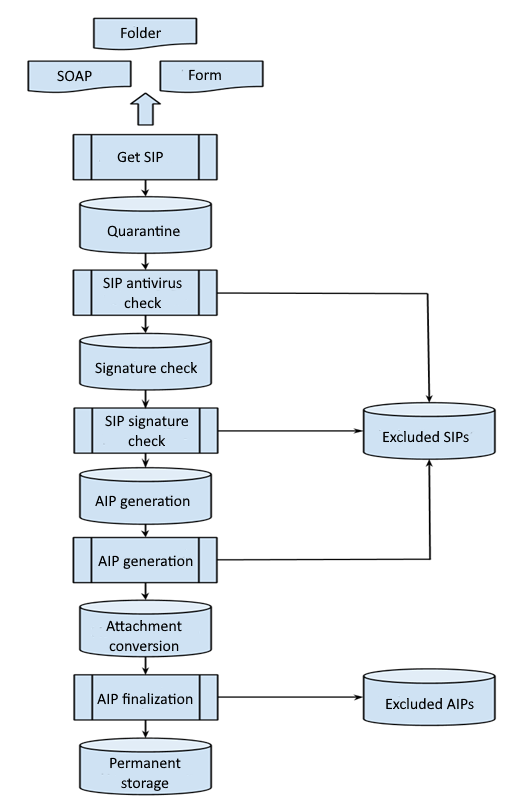
The Get SIP service
This service gets documents from an external source. The external source can be a web service, a folder on a computer drive, a 602XML form, etc. The service gets a document, packs it in an internal SIP package and places it in the “Quarantine” repository.
The Antivirus check service
This service input is the “Quarantine” repository. The service runs an antivirus check on the SIP package attachments and if it finds a virus, moves the package in the "Excluded SIP packages" repository. Otherwise, it moves the SIP in the “Signature validation” repository.
The SIP signature validation service
The input is the “Signature validation” repository. The service validates the SIP package signature. If the signature is valid, the service moves the SIP in the “AIP generation” repository. Otherwise, the SIP is moved to the “Excluded SIP packages” repository.
The AIP generation service
The input is the “AIP generation” repository. The service generates the basic AIP package structure and saves it in the “Attachment conversion” repository. If the service fails to convert the SIP package to AIP, the SIP package is moved to the “Excluded SIP packages” repository.
The AIP finalization service
The AIP package stays in the “Attachment conversion” repository until the conversion service converts all the package attachments. Then the AIP package is finalized and stored in the Archive permanently. From now on, the package is visible for the long-term preservation service and can be registered in it.
This is only one of the possible AIP generation scenarios. The only mandatory repository where the AIP package must end up is the “Permanent storage” repository.
The default implementation of the form attachment extraction process
FormFlow has the default implementation of the ingest process. The input is an archived form, from which attachments have already been extracted by the udat service. The udat service for attachment extraction only uses the data record stored in RECEIVED_DATA_UFRM or RECEIVED_XSLFO_UFRM. It does not run any plugins. E.g. it does not reflect any changes from the form_download_plugin. This must be kept in mind and modify the attachments and their attributes such as ltv_accept_udat before saving the data record in the database. The AIP packages will be inserted as attachments to forms from which they were created.

AIP package structure
An AIP package is stored in the archive as an asic-e container. The container has the following structure:
/
├── META-INF/ ← folder with the package details
│ ├── mets.xml ← unsigned metadata for files
│ ├── signatures.xml ← file with external signatures
│ └── transaction.log ← package event log
├── contents.xml ← METS container
├── DOCUMENT_ID.pdf ← attachment x
├── DOCUMENT_ID.doc ← attachment y
├── DOCUMENT_ID.txt ← attachment z
└── mimetype
META-INF/mets.xml & contents.xml
The META-INF/mets.xml file contains unsigned metadata. This metadata can change during the package lifecycle. If the metadata structure or the document changes in the archived form, this file will change too.
The file contents.xml contains links to attachments. It also contains the metadata structure and the individual attachments at the time the package was created. This part is signed and cannot be edited later.
signatures.xml
The file signatures.xml contains external signatures for files placed in the package root. In this case, the file signatures.xml contains the external signatures for files contents.xml, DOCUMENT_ID.pdf, DOCUMENT_ID.doc, DOCUMENT_ID.txt.
How the AIP package works
Form template settings
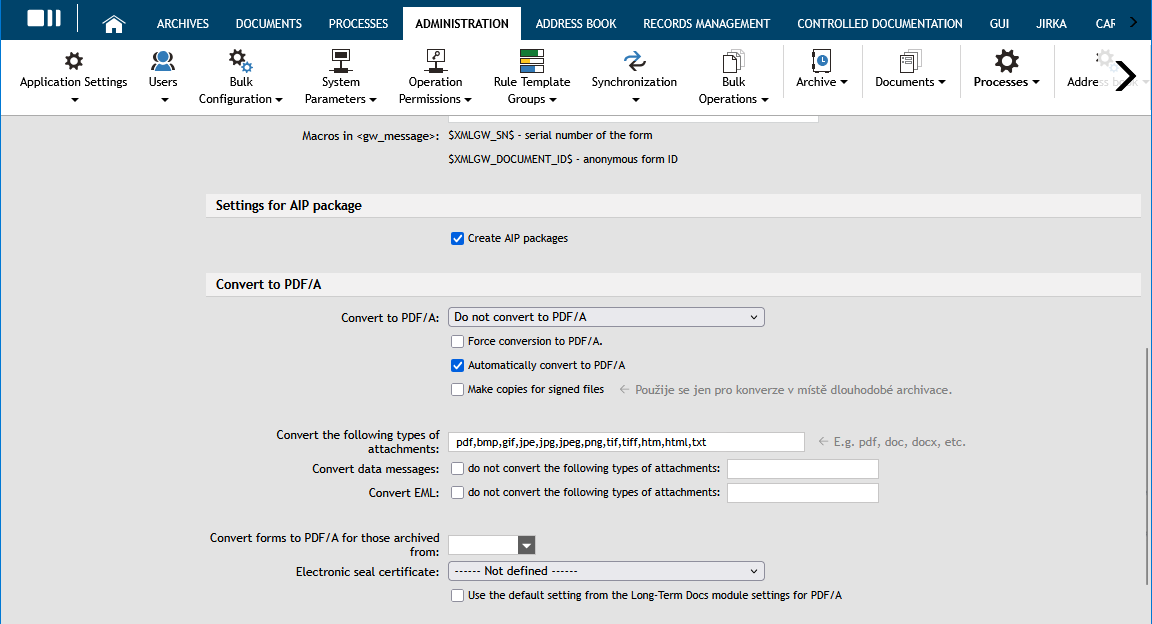
To create AIP packages, set the form template to generate them from the attachments of archived forms.
Creating an AIP package
The AIP service takes a form and uses the Create AIP repository (AM_SIPCreateAIPRepository) function to create its envelope.
The result of this operation can be seen in the XG_AMRR table, where the ID_AMRE_AMRR column contains an ID that corresponds to creating an AIP repository (AM_SIPCreateAIPRepository).
Resolving errors during creation
If an error occurs at this point, the XG_AMRR table entry for the form will have an ID_UFRM_AMRR value corresponding to ID_UFRM in XG_UFRM.
The ID_AMRE field will contain the ID of the SIP exclude repository (AM_SIPExcludeRepository).
Returning the form to the process
If the above described situation takes place, it is recommended to wait until the value of NUMBER_OF_READ_AMRR reaches 5.

If the value in ID_AMRE_AMRR for the form corresponds to the SIP exclude repository (AM_SIPExcludeRepository), it can be placed in the process again by deleting the corresponding entry in the XG_AMRR table based on ID_AMRR.
Checking the attachments and conversion
-
The next step is a check whether the AIP package has all attachments, whether the attachments exist and whether the form has not been deleted in the meantime.
-
After the check, the XG_AMRR table’s value of ID_AMRE_AMRR for the form is se to the ID for AIP normalization files repository (AM_AM_AIPNormalizationFilesRepository).
-
Another check is run to make sure that all attachments have been successfully converted with the LTA service. It is necessary to ensure that the LTA service is running.
Saving to permanent storage – finished AIP
If all steps complete successfully, the value in the XG_AMRR table for the AIP package will be ID_AMRE_AMRR = ID for Permanent repository for AIP packages (AM_AIPPermanentRepository).
Resolving conversion errors
-
If an error occurs, the ID for AIP exclude repository (AM_AIPExcludeRepository) will be set in ID_AMRE_AMRR.
-
Wait until NUMBER_OF_READ_AMRR reaches 5.
-
If this situation occurs, we recommend checking the XG_CONV table and see which attachments failed to convert, what is their error message PDFA_ERROR_MESSAGE_CONV and their output code PDFA_RESULT_CODE_CONV, if any.
Document conversion status (AIP package)
- CONVERSION_OK = 2000
-
The conversion completed successfully.
- CONVERSION_FAILED_TEMP = 2001
-
The conversion failed temporarily (e.g. due to temporary issues, it is possible to retry).
- CONVERSION_FAILED = 2002
-
The conversion failed permanently (cannot complete).
- CONVERSION_NOT_NEED = 2003
-
The conversion is not need (the document is already in the correct format).
- CORRUPTED_DOCUMENT = 2004
-
The document is corrupted and cannot be processed.
- CONVERSION_HAS_NOT_YET_BEEN_MADE = 2005
-
The conversion hasn’t been done yet.
- CONVERSION_IN_PROCESS = 2006
-
The conversion is currently running.
- PREPARE_FOR_INPLACE_CONVERSION = 3000
-
Preparation for in-place conversion.
Exceptions during attachment conversion (AIP package)
-
If the conversion code is one of the following: 7, 92, 15, 111, the original attachment will be used instead of the converted attachment.
-
If the conversion is not successful even after 5 unsuccessful attempts, it is necessary to keep the attachment original and continue analysing the reason for conversion failure.