Bulk posting form
Click the Bulk posting form entry to set up which mail delivery methods can use the bulk posting form. Registered customer cards can be also configured here.
Check or uncheck Enabled next to each configuration entry to set whether it is in use.
Click  next to any configuration entry to display a help window.
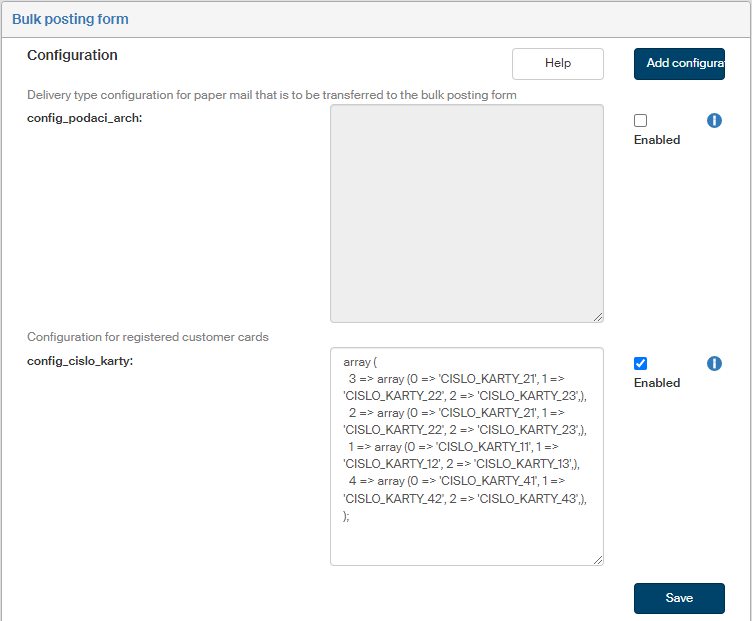
-
config_podaci_arch – configure the mail delivery types that can be transferred in a bulk posting form.
This configuration specifies which delivery types can be placed on a bulk posting form.
If this configuration is not set, all 3 delivery types are transferred to the bulk posting form.
The configuration is written in two nested arrays. The index of the first array is ID_CERT of the entity.
Index of the second array is the delivery type: 1 = ordinary mail, 2 = registered mail, ** 3 = mail with a certificate of delivery.
Example configuration for entity ID_CERT = 28 with two delivery types:
array ( 28 => array ( 2 => 'registered mail', 3 => 'mail with a certificate of receipt', ) ); -
config_cislo_karty – configure registered customer cards in this field. Every entity can have several customer cards registered at the post office. You can then select one of the customer cards from this configuration in the bulk posting form. The configuration is written in two nested arrays. The index of the first array is ID_CERT of the entity. The contents of the second array is the list of IDs of the registered customer cards.
Example configuration for entity
ID_CERT = 28with three customer cards:array ( 28 => array (0 =>'CARD_NO_1', 1 => 'CARD_NO_2', 2 => 'CARD_NO_3') );
If you are missing a configuration entry from the list, you can add it. Click the Add configuration button in the upper right corner of the screen. The dialog Add configuration is displayed. It is identical to the window displayed and described in the previous chapter.
Enter the Variable name and Variable value. Select the Variable type from the list, the options are the following: Variable, Define and Array.
Then click Save to confirm the new configuration and its changes.