Installing a connector to Slovak Electronic mailboxes
This connector is used to connect the FormFlow Records management to the Slovak Electronic mailbox system. For more details, see https://www.slovensko.sk/en/faq/_frequently-asked-questions-and.
When installing FormFlow, switch the Installer in configModules.ini to Slovak interface.
Example:
;dzhp['ESS_install_forms_cz_sk']=2;Optional entry - 1.5.3.1.1 – select which language versions of forms to install (1=Czech only, 2=Slovak only, 3=both Czech and Slovak).
Installing Root CA and Intermediate certificates
All needed certificates, such as the Root CA and any Intermediate CA, must be installed in Windows under the runtime user who is set up as the identity for the FormFlow application pool, and also in the Local computer store.
The store is Trusted root certification authorities.
These certificates are located in folders
c:\wwwroot\FormFlow\bin\ks\certificates\{dev,pre,prod}
eschranka1.slovensko.sk.crt
iamwse.slovensko.sk.crt
usr.slovensko.sk.crt
uir.slovensko.sk.crt
sts.upvsp.gov.sk_ca.slovensko.sk_.cer
Thawte RSA CA 2018.cer
ca.slovensko.sk.cer
DigiCert.cer
UPVS uses them to communicate with the individual modules (IAM, eDesk, MED, eForm, G2G). During SSL connection from FormFlow, the corresponding communication certificate from this location is validated against the one installed in the store.
This means that if ÚPVS updates any communication certificate, the certificate needs to be installed both in Trusted root certification authorities and physically in *.cer format atc:\wwwroot\FormFlow\bin\ks\certificates\prod\.
|
Installing the technical identity certificate
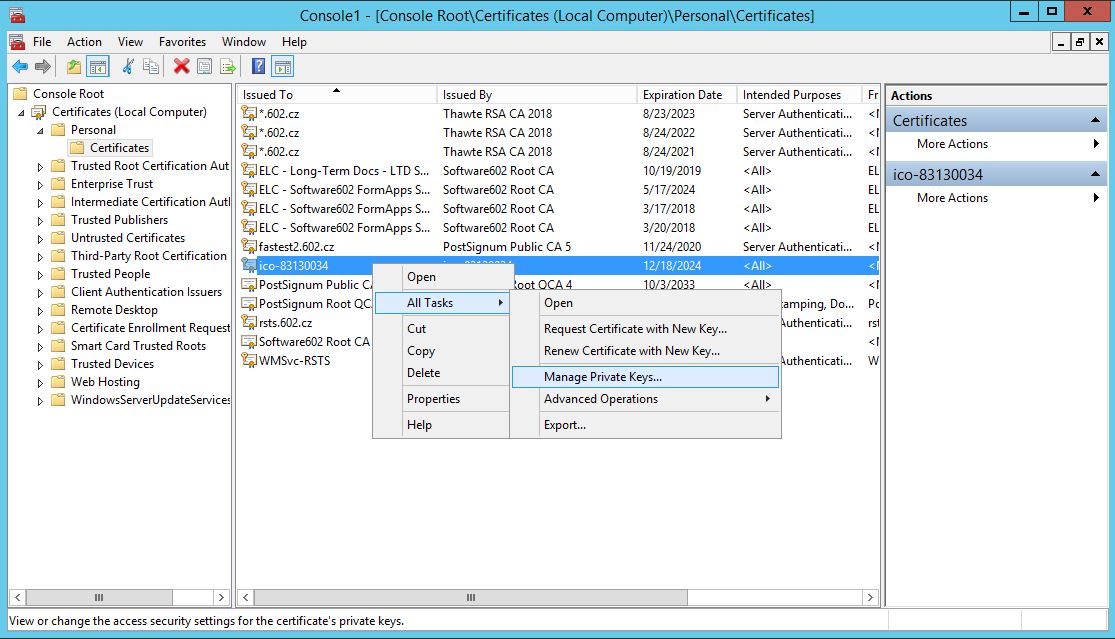
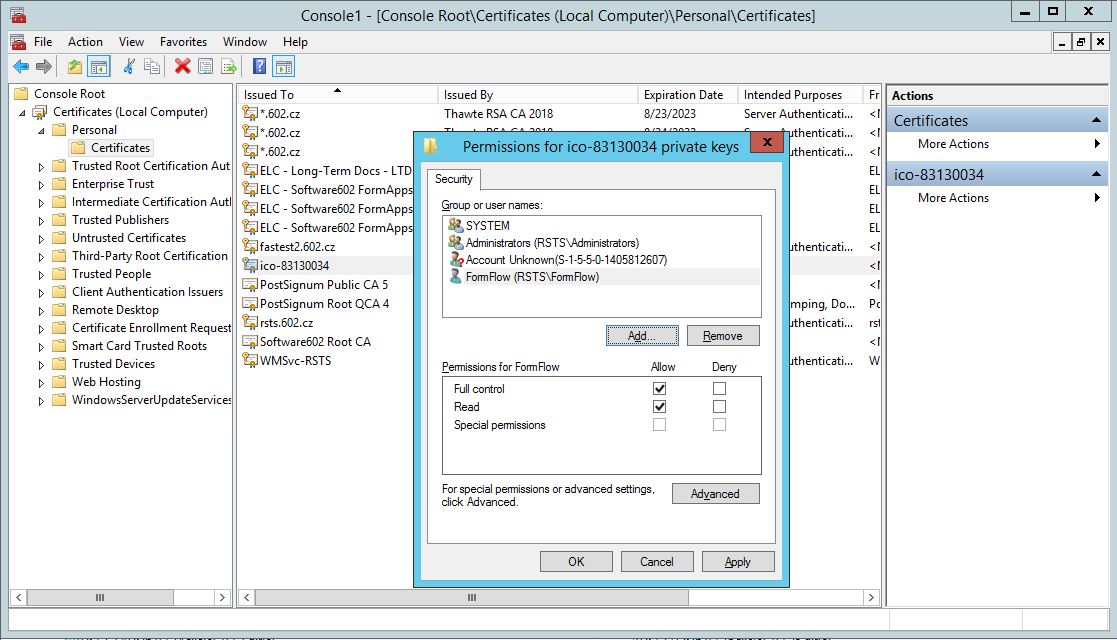
Client certificate (selfsign), marked as a technical identity certificate and used to access the Slovak electronic mailbox, must be installed under the runtime user in the operating system’s “personal” certificate store (current user) and also in local computer, then click the right mouse button to set up the application pool permissions.
Form environment and configuration
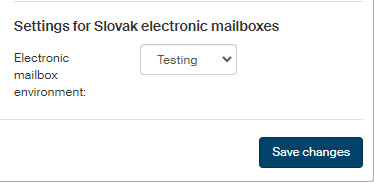
The environment selection needs to be also set manually in FormFlow GUI ().
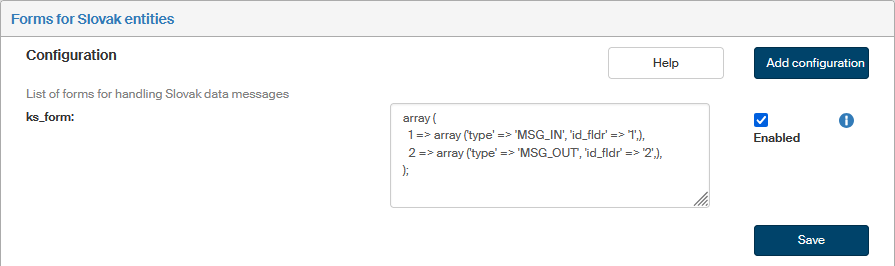
Continue the configuration by selecting the forms for Slovak entities ().
In the GUI, edit the ID_FMVE value to the correct one and check Enabled. Then click Save.
Example:
Make sure that the URL for UPVS web services are accessible from the server.
Testing environment
https://eschranka.upvsfixnew.gov.sk/
https://uir.upvsfixnew.gov.sk/
https://usr.upvsfixnew.gov.sk/
https://iamwse.upvsfix.gov.sk:8581/sts/
Production environment
https://eschranka1.slovensko.sk
https://uir.slovensko.sk/
https://usr.slovensko.sk/
https://iamwse.slovensko.sk:8581/sts
https://mail.upvsfixnew.gov.sk/
If there is a proxy set up for FormFlow and the URLs above will be accessible without a proxy, the port must be included in the URLs.
Example:
define('XMLGW_NOPROXY', 'iamwse.upvsfix.gov.sk: 8583');