Notifications
Open the Notifications screen by going to to set up a notification for the expiry of metadata value of Date or Date and time value.
In the Notifications screen, set up a notification for an upcoming expiry of a date specified in a Date or Date and time metadata item (e.g. CREATED_TS_DOCU, SHRED_TE_VALID_UP_TO_DOCU, FINISHED_TS_DOCU) and document status (ID_STAT_DOCU). A notification is created for a combination of one metadata item of Date or Date and time type and at least one folder; you can specify for each folder whether to apply the notification to the folder itself only or the whole subtree branching from this folder. The notification will monitor the metadata value on all object stored in the specified folders or subtrees.
The screen displays all existing notification settings and their edit controls.
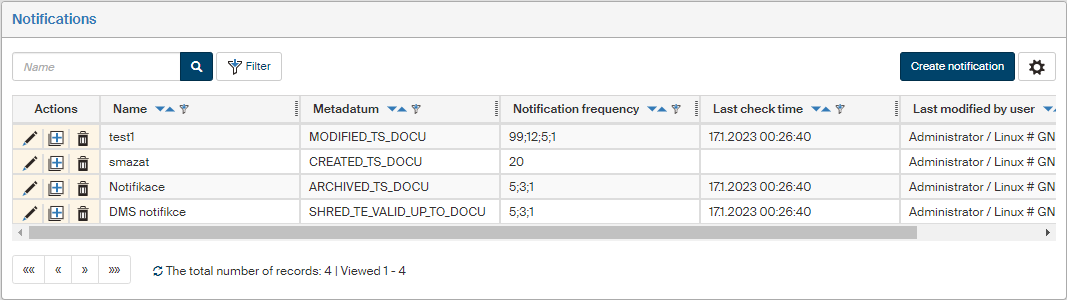
-
Click
 Edit notification to review and edit the notification parameters.
 -
Click
 New notification with the same parameters to create another notification setting by editing the parameters of an existing notification.
 -
Click
 Delete notification to remove the selected entry.
Set up a new notification in the New notification dialog opened by clicking the Create notification button.
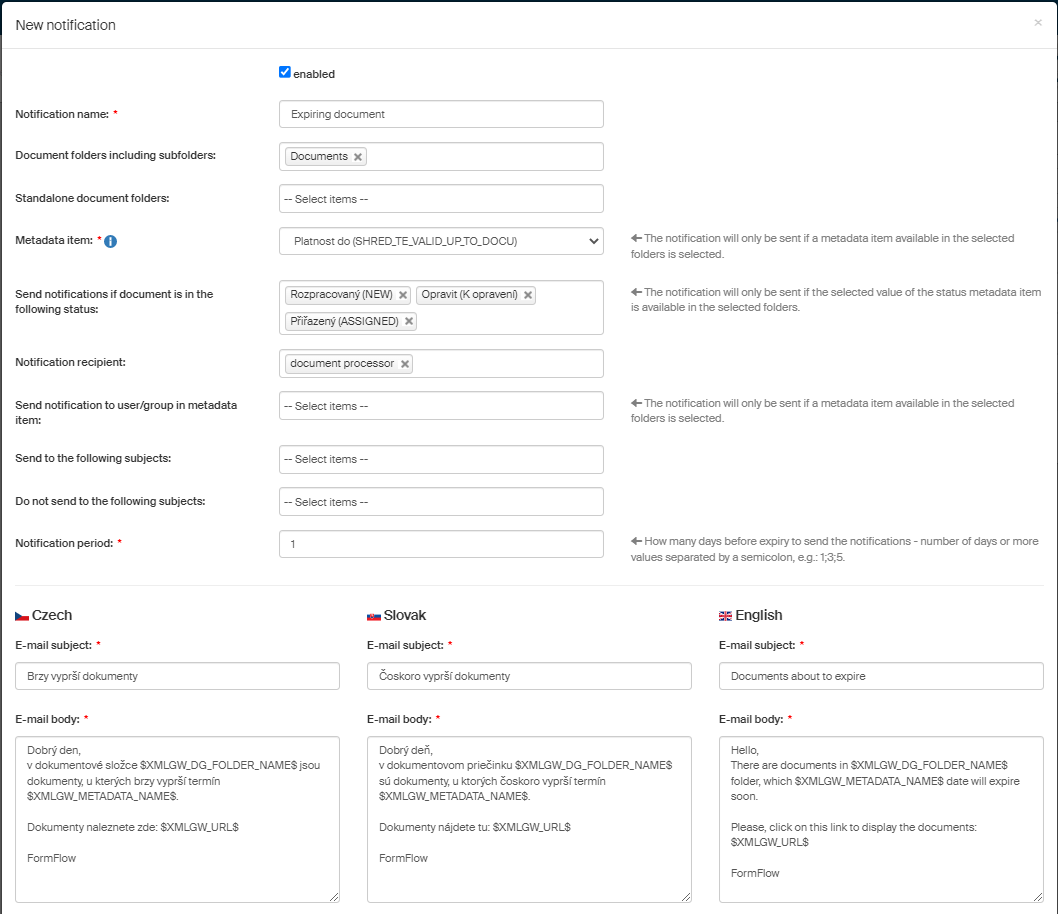
Notification settings:
-
You can create multiple notifications for the same metadata item to set up various sending conditions.
-
Select any number of DMS folders (archive folders are not available) from the folders visible to you; select whether to apply the notifications to the folder only (standalone folder) or also its subfolders; there is a multiselect field available for both the options. If you select a folder in both the fields, the notification will apply to the subfolders too.
-
When you have selected the folders, select one metadata item of Date or Date and time type, which will be checked for expiry. Only metadata visible in all the selected folders will be available in the field.
-
The other condition for sending a notification is the metadata item Status (ID_STAT_DOCU); only document statuses available in all the selected document folders are available to select. Example: the notification is only sent if there are 7 days left to expiry and the status is in progress or assigned.
-
Select the notification recipient from the following options:
-
specific subjects – users, groups, roles; if a group or role is selected, the notification will be sent to all its members,
-
document author,
-
document processor (the user who is set as the document processor/officer at the time the notification is sent),
-
document author’s immediate superior,
-
document processor’s immediate superior.
-
-
Notifications can be sent to a user/group specified in a metadata item of data type User or Group or role.
-
You can also exclude subjects (users, groups, roles) from receiving notifications.
-
Specify the notification period as a number of days before the metadata value. You can enter more than one notification periods (e.g. 14d;7d;3d;)
-
Notifications are sent using a background service; in case of notifications calculated in days, they are sent shortly after midnight.
-
Expiry notifications in the order of days (14d;7d;…) are aggregated and sent once a day per each document folder; the notification contains a link to a filtered list with all documents expiring according to the set-up criteria.