Login using the SAML standard
Security Assertion Markup Language (SAML) is an XML-based standard providing a method of exchanging authentication and authorization data between the parties involved, i.e. between the service provider and identity provider. It is based on the “trust assertion” principle, meaning that the application can assert that it is a certain user and the user has certain privileges.
-
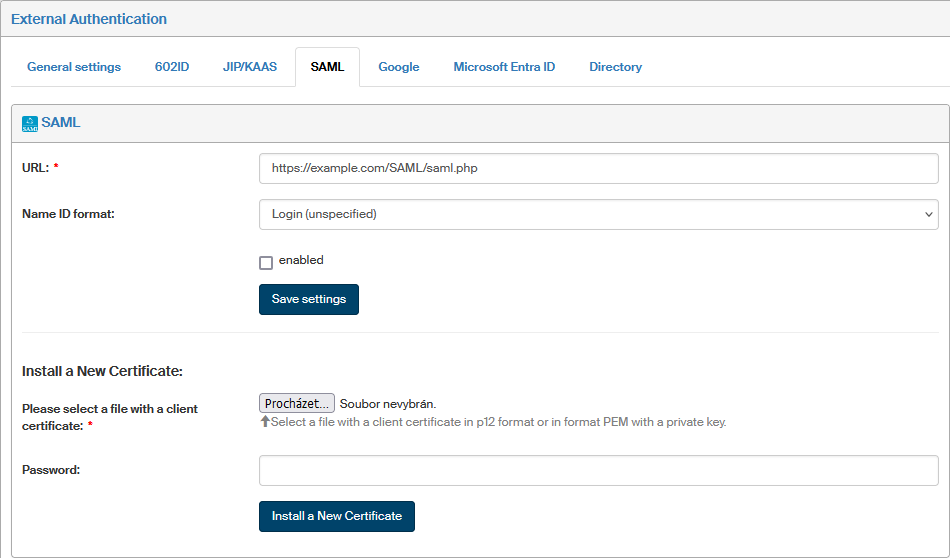
Go to and switch to SAML tab.
-
Enter the location address where the authentication server is running in the URL field.
-
Use the field Name ID format to specify what to use as basis for authentication, that is, what to check for a match.
-
Login (unspecified)
-
E-mail (emailAddress)
-
Subject name (X509SubjectName)
-
Entity (entity)
-
Windows Domain and Login (WindowsDomainQualifiedName).
-
-
Check Enabled to enable this login method using the SAML standard with the above settings.
Click Save settings to save the above settings to FormFlow configuration.
The lower part of the page is used to install a digital certificate with a private key to secure this external authentication method:
In section Install a new certificate, insert a file with the client certificate in P12 or PEM format, containing the certificate including the private key.
|
You can get the required format from PFX or P12 using the following command:
|
Enter the certificate password in the Password field and select Save certificate to confirm. Use similar steps to replace an installed certificate with a new one.
If there is a certificate already installed, you will find its description in section Certificate info.