Outgoing mail
Click the Outgoing mail room entry to set up the methods for distributing traditional paper mail among the mail room staff.
Check or uncheck Enabled next to each configuration entry to set whether it is in use.
Click  next to any configuration entry to display a help window.
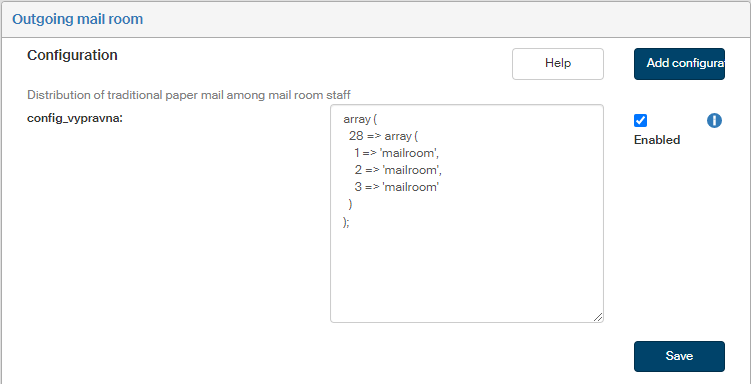
The config_vypravna field is used to set up how to distribute traditional paper mail among the mail room staff. Use this configuration to determine mail room staff who will process specific delivery methods. The configuration is written in two nested arrays.
The index of the first array is ID_CERT of the entity. Index of the second array is the delivery type:
-
1 = ordinary mail,
-
2 = registered mail,
-
3 = mail with a certificate of delivery.
The value in the second field is the mail room employee’s username.
Example configuration for entity ID_CERT = 28 with three mail room employees:
array (
  28 => array (
    1 => 'LOGIN_NAME_1',
    2 => 'LOGIN_NAME_2',
    3 => 'LOGIN_NAME_3'
  )
);
Then click Save to confirm the new configuration and its changes.
If you are missing a configuration entry from the list, you can add it. Click the Add configuration button in the upper right corner of the screen. The dialog Add configuration is displayed. It is identical to the window displayed and described in the previous chapter.
Enter the Variable name and Variable value. Select the Variable type from the list, the options are the following: Variable, Define and Array.