Downloading and sending data messages
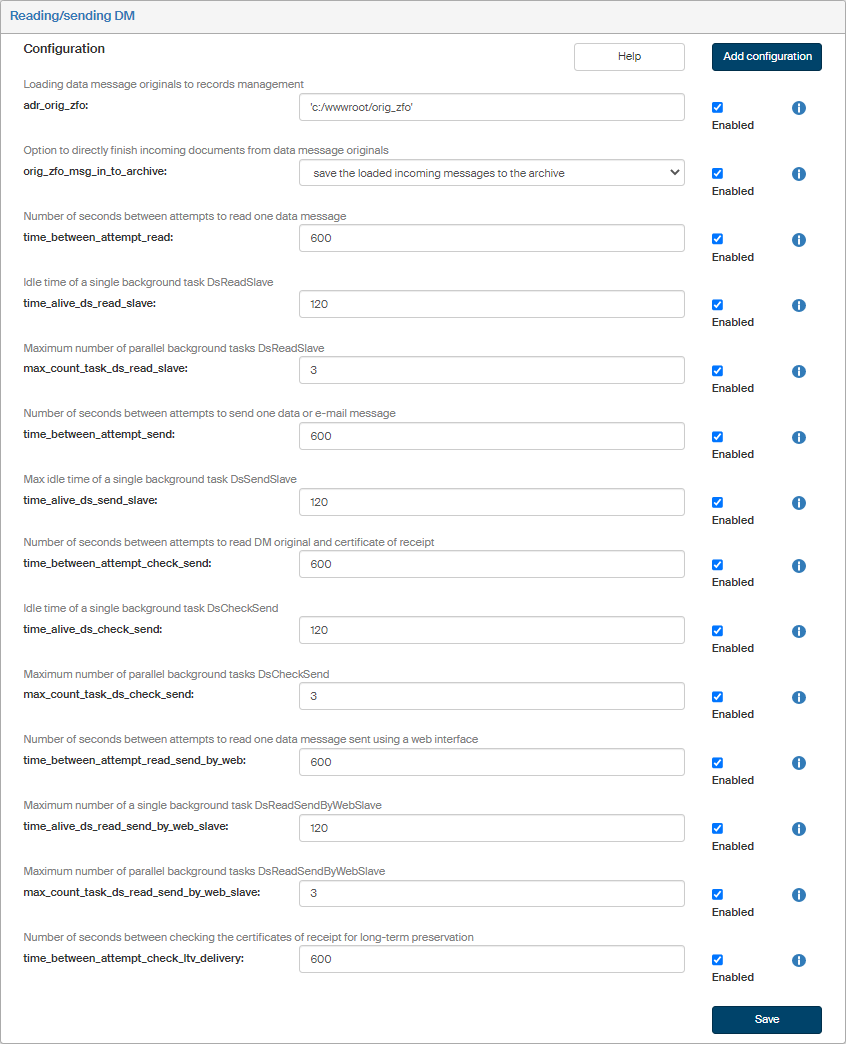
Click Reading/Sending DM to configure the parameters for downloading and submitting data messages.
Check or uncheck Enabled next to each configuration entry to set whether it is in use.
Click  next to any configuration entry to display a help window.
-
adr_orig_zfo – the folder from which data message originals will be loaded to the records management. The folder must not end with a slash. Run “utils/dzhp/ds_read_from_file.cmd” to start the task for loading data message originals. Data message originals will be deleted from this folder when they are successfully loaded to records management. Example: ‘c:/wwwroot/orig_zfo’
-
orig_zfo_msg_in_to_archive – set whether to leave the downloaded incoming messages from data message originals in the section “In progress” or to process them and save them in the section “Finished”. Options: "save the loaded incoming messages to the archive", "save the loaded incoming messages as in progress".
-
time_between_attempt_read – number of seconds between attempts to read a single data message. A typical value is e.g.: 600.
-
time_alive_ds_read_slave – maximum idle time of a single background task DsReadSlave. It is expected that one message will surely be loaded in the given time.
-
max_count_task_ds_read_slave – maximum number of parallel background tasks DsReadSlave – processing data message originals. In most cases, the value 1 is enough, or up to 3 for a large amount of data messages.
-
time_between_attempt_send – number of seconds between attempts to send one data or e-mail message. A typical value is e.g.: 600.
-
time_alive_ds_send_slave – maximum idle time of a single background task DsSendSlave. It is expected that one data or e-mail message will surely be sent in the given time.
-
max_count_task_ds_send_slave – maximum number of parallel background tasks DsSendSlave – sending data messages and e-mail. In most cases, the value 1 is enough.
-
time_between_attempt_check_send – number of seconds between attempts to read a single DM original or certificate of receipt. A typical value is e.g.: 600.
-
time_alive_ds_check_send – maximum idle time of a single background task DsCheckSend. It is expected that one data message original or certificate of receipt will surely be loaded in the given time.
-
max_count_task_ds_check_send – maximum number of parallel background tasks DsCheckSend. In most cases, the value 1 is enough.
-
time_between_attempt_read_send_by_web – number of seconds between attempts to read a single data message sent using the web interface. The typical value is e.g.: 600.
-
time_alive_ds_read_send_by_web_slave – maximum idle time of a single background task DsReadSendByWebSlave. It is expected that a single data message sent using a web interface will surely be sent using the web interface in the given time.
-
max_count_task_ds_read_send_by_web_slave – maximum number of parallel background tasks DsReadSendByWebSlave. In most cases, the value 1 is enough.
-
time_between_attempt_check_ltv_delivery – number of seconds between checking the certificates of receipt for long-term preservation. A typical value is e.g.: 600.
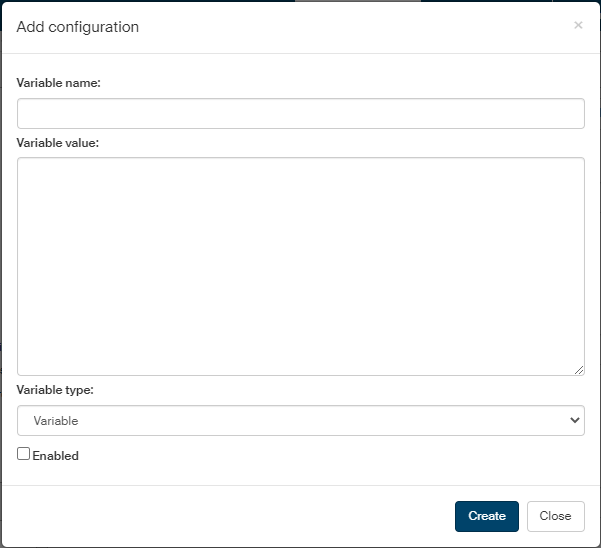
If you are missing a configuration entry from the list, you can add it. Click the Add configuration button in the upper right corner of the screen.
In the Add configuration screen, enter the Variable name and Variable value. Select the Variable type from the list, the options are the following: Variable, Define and Array. Check Enabled to put the setting to use immediately.
Then click Save to confirm the new configuration and its changes.