Document conversion
There are two types of conversion available in FormFlow for the Electronic records management:
-
Conversion by right of office (KzMÚ).
-
Conversion according to §69a.
Conversion by right of office
Conversion by right of office can be selected directly in a records management form settings – Incoming document, Outgoing document – in the dialog Edit configuration.
Open the dialog by going to . Click the pencil button (Edit form configuration) in the row corresponding to the selected form.
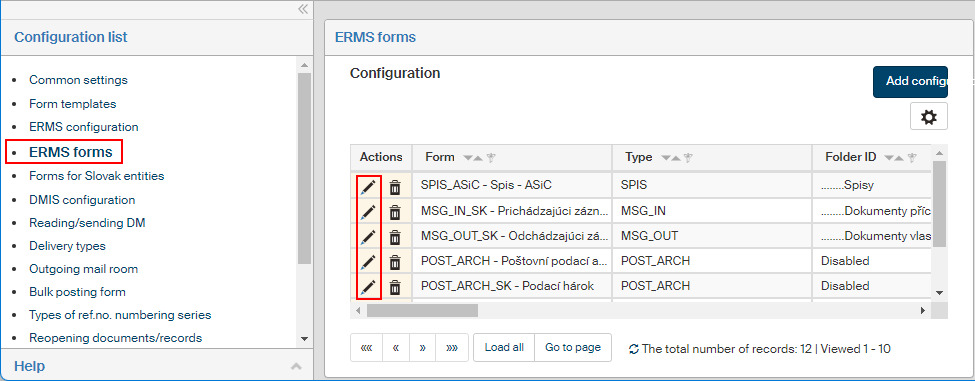
The screen Edit configuration will be displayed. Set Conversion controls to Display controls for conversion by right of office. Now the controls for conversion by right of office will be displayed in the Incoming document and Outgoing document forms next to attachments.
| This parameter can only be set for these two form types. |

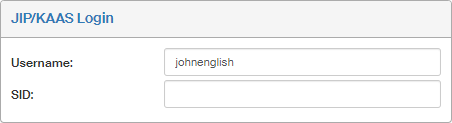
This conversion type requires having login details set up for JIP/KAAS. For more information, see chapter JIP/KAAS authentication.
Conversion according to §69a
Selected originators (public administration, commercial entities with delegated competence, etc.) can, based on § 69a of act no. 499/2004 Sb., on archiving and records management:
-
Convert a document from analog to digital form and back using a method that ensures the document’s authenticity, contents inviolation, document legibility and secure conversion process. It is a process similar to authorized conversion, performed not by the Czech POINT but using a records management service, which will attach its validation clause. The advantage is that all documents can be converted this way and, after 3 years, the original documents can be destroyed. A document converted this way has the same legal effect as a certified copy of the original document.
-
Changing the data format of a digital document while ensuring the document’s authenticity, contents inviolation, document legibility and secure conversion process. This procedure is applied to documents that are not in the output data format (e.g. received documents) and need to be converted in a trustworthy way in the output data format (typically PDF/A) for retention management. The converted document has the same legal effect as a certified copy of the original document.
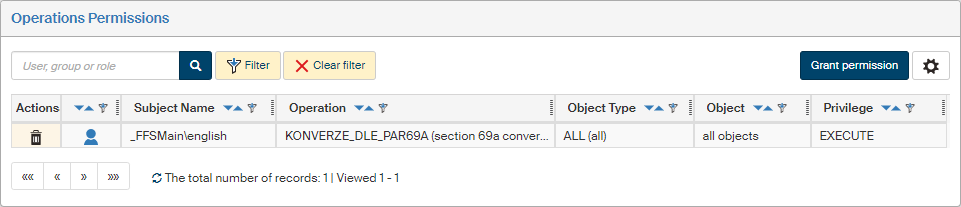
To use conversion according to §69a from paper to electronic form and back, users need the permission "KONVERZE_DLE_PAR69A (section 69a conversion)".
Set up the permission in the Grant permission dialog ().
Set the following parameters in the Grant permission dialog:
-
Permission – keep the EXECUTE option.
-
Subject – look up the user or group to receive the permission, using the autocomplete feature.
-
Operation – use the autocomplete feature to look up and select the option KONVERZE_DLE_PAR69A (section 69a conversion).
-
Object types – keep the ALL (all) option.
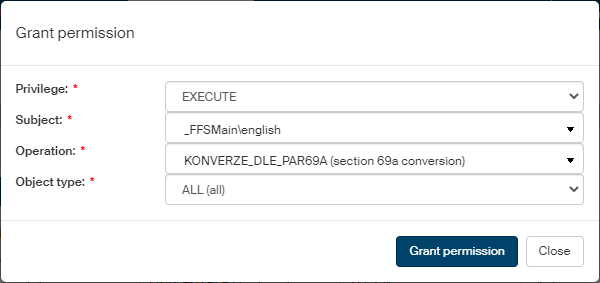
Click Grant permission to save the setting.