Debug log
Click the Debug log entry to set up the parameters for the debug log – the folder, logging method, logged PHP scripts.
Check or uncheck Enabled next to each configuration entry to set whether it is in use.
Click  next to any configuration entry to display a help window.
-
DZHP_DEBUG_LOG_DIR
The folder where debug logs will be saved; besides an absolute path, the define from FormFlow config.php can be used: XMLGW_LOGDIRE.g.:
XMLGW_LOGDIR . '/ess/debug'It is important for the path not to end with the / character. Make sure the folder exists.
-
DZHP_DEBUG_LOG_APPEND
The manner in which the debug logs are written.-
Overwrite logs = each call of the specified script will overwrite the log file. This is the standards setting so that the logs do not grow in size.
-
Append logs = each call of the specified script will add logged details to the log file.
Note that the log files will keep growing in size with this setting.
If this parameter is disabled, the debug log files are overwritten.
-
-
config_debug_log
A list of PHP scripts that will write in debug logs. Enter the list of PHP scripts as a single array in the key => value format, where the key is the PHP script name without an extension.-
0 = do not write in the debug log
-
1 = write in the debug log.
Example setting of debug logging for two scripts,
msg_in_after.phpandmsg_out_after.php:array ( 'msg_in_after' => 1, 'msg_out_after' => 1 );
-
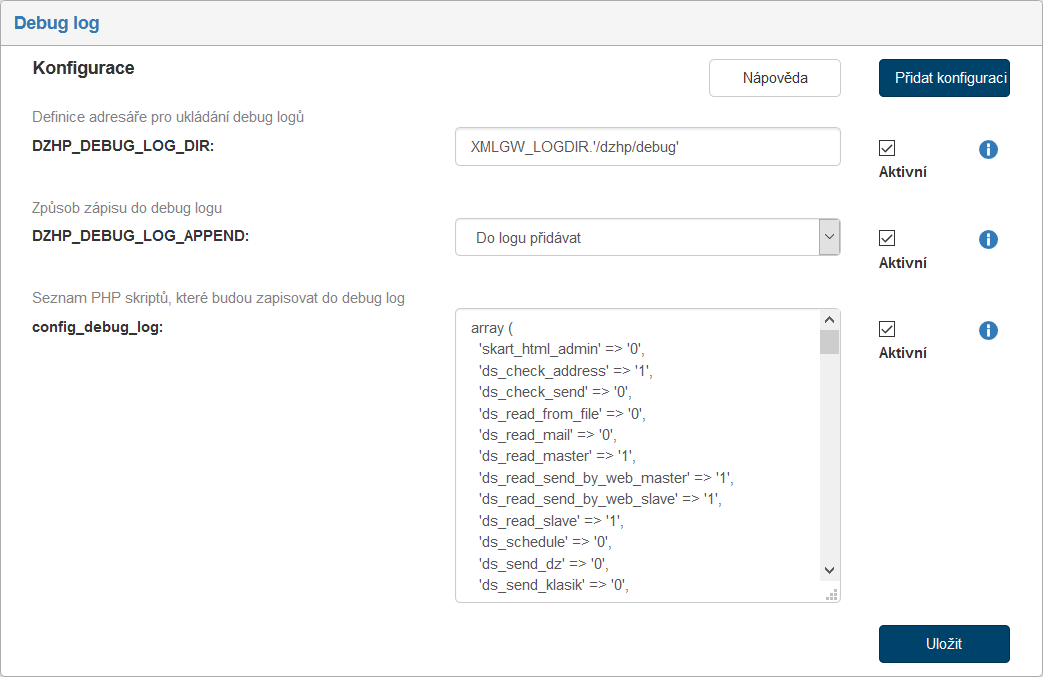
If you are missing a configuration entry from the list, you can add it. Click the Add configuration button in the upper right corner of the screen. The dialog Add configuration is displayed. It is identical to the window displayed and described in the previous chapter.
Enter the Variable name and Variable value. Select the Variable type from the list, the options are the following: Variable, Define and Array.
Then click Save to confirm the new configuration and its changes.