Document processing
Each records management document must have its processing method filled in when it is finished/archived. Typical methods of processing a document are e.g. by a reply, acknowledging or forwarding.
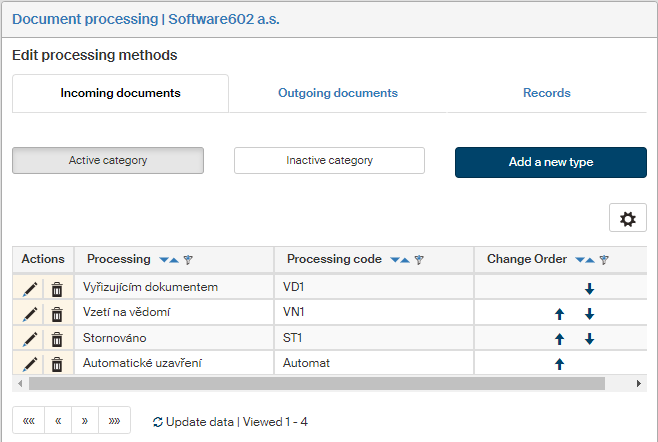
On the left panel in the Entities screen (), make sure the entity you want to edit is selected in the Entities list. Then go to Menu and click Document processing. The screen Document processing (entity name) is displayed on the right. The section contains a list of document processing methods, which you can edit or add to.
The screen is divided to three tabs: Incoming documents, Outgoing documents and Records. Processing methods are defined for each type separately.
Use the buttons placed below to switch within the selected type between Active categories, meaning those currently available in forms, and Inactive categories, which are not in use. Click Add a new type to display a dialog to create a new document processing method.
Creating a document processing method
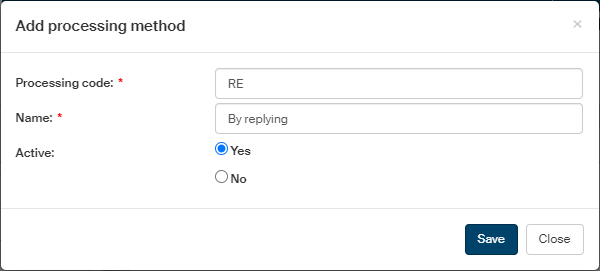
Click Add a new type on the right above the list of existing processing methods to display the Add processing method dialog.
-
Enter any characters in the Processing code field. The code must be unique, it is not allowed for more than one processing method to use the same code.
-
The text in the Name field will be displayed in the Document processing method list in Incoming documents and Outgoing documents, and in the list Record processing method in the Record form.
-
Use the switch in the Active field to enable or disable displaying this processing method in forms.
-
Some customer solutions use special reference number types. If you are using them, select the required type in Select the type of ref.no.
Click Save to confirm the settings.
Editing a document processing method
The Document processing screen displays a list of existing processing methods for the selected document type (one of the three tabs) and the active/inactive options. Use the buttons in the Actions column to manage the entries.
-
Click
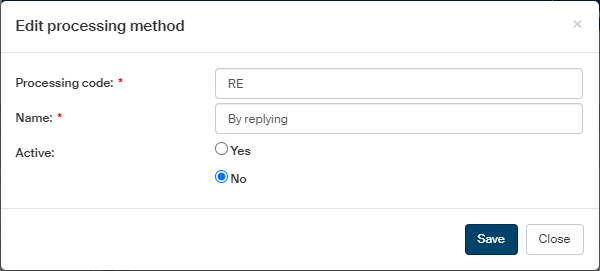
 Edit processing type to open the processing method edit dialog.
 -
Click
 Delete processing type to remove the entry.
 -
Change the order of rows using the arrows in the Change order column.