E-mail settings
You can use the screen E-mail Settings () to globally enable or disable sending notification e-mails by checking or unchecking e-mail is enabled.
Use the field E-mail sending interval to set how often to run the service that sends prepared e-mail messages. The default value is 5 minutes, the lowest allowed value is 1 minute.
The contents of the fields Sender address and Sender name will be used as the e-mail sender details.
Enter the address of the SMTP server to be used in the SMTP server field and, if needed, set the Transmission security and/or Port as well.
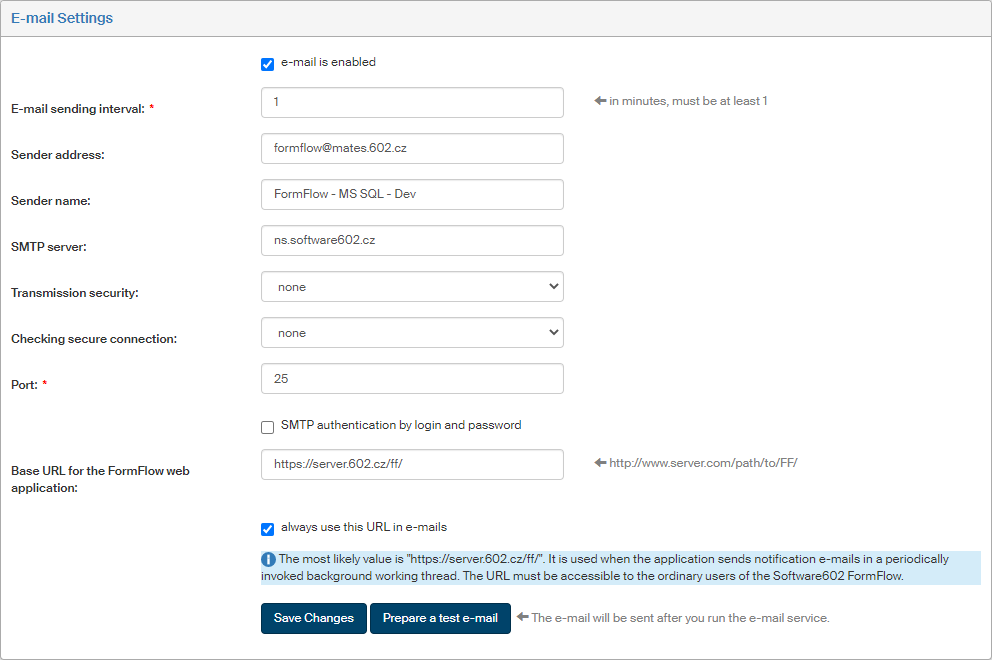
To use SMTP authentication by login and password, check the corresponding box. A pair of fields to enter the corresponding access details, SMTP username and SMTP password, is then displayed.
The field Base URL of the FormFlow web application contains the web address the users visit to access FormFlow. The most likely value is displayed in the tip for the field. If you check always use this URL in e-mails, notification e-mail messages will include this address.
Click the button Prepare a test e-mail to create a task to send an e-mail message. The message will be actually sent the next time the e-mail service is run, based on the E-mail sending interval setting.