Login using a certificate
FormFlow authentication options include login using a commercial certificate.
To use this login method, you will need:
-
A valid certificate in PFX or P12 format (contains the private part). Install this certificate in your operating system’s personal store or in the store of a browser.
-
The public part of the certificate above, in cer or der format.
How to set it up:
-
The user visits the screen My settings to add the commercial certificate in the required format and enters its description. An administrator can do this step for the user by going to ; the steps are described in chapter Change password or certificate.
-
The user edits My settings to switch the value in Login using certificate field to yes, X.509 certificate is sufficient to login. An administrator can do this step for the user by going to .
This certificate must be added to user Administrator too, so that it is possible to continue logging in to FormFlow using the Administrator account. -
The Administrator switches the login method setting for FormFlow by checking “https connections to FormFlow must require valid user certificates” in window .
-
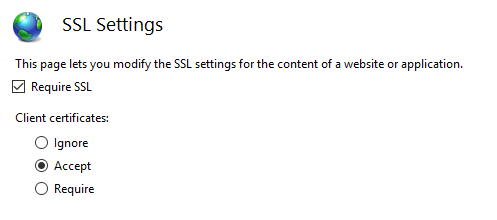
The Administrator changes the SSL settings for the specific application in the Internet Information Services Manager to the values in the image below and clicks Apply in the Actions panel to confirm the configuration.
-
The Administrator then restarts the IIS or the application pool.