Dashboard
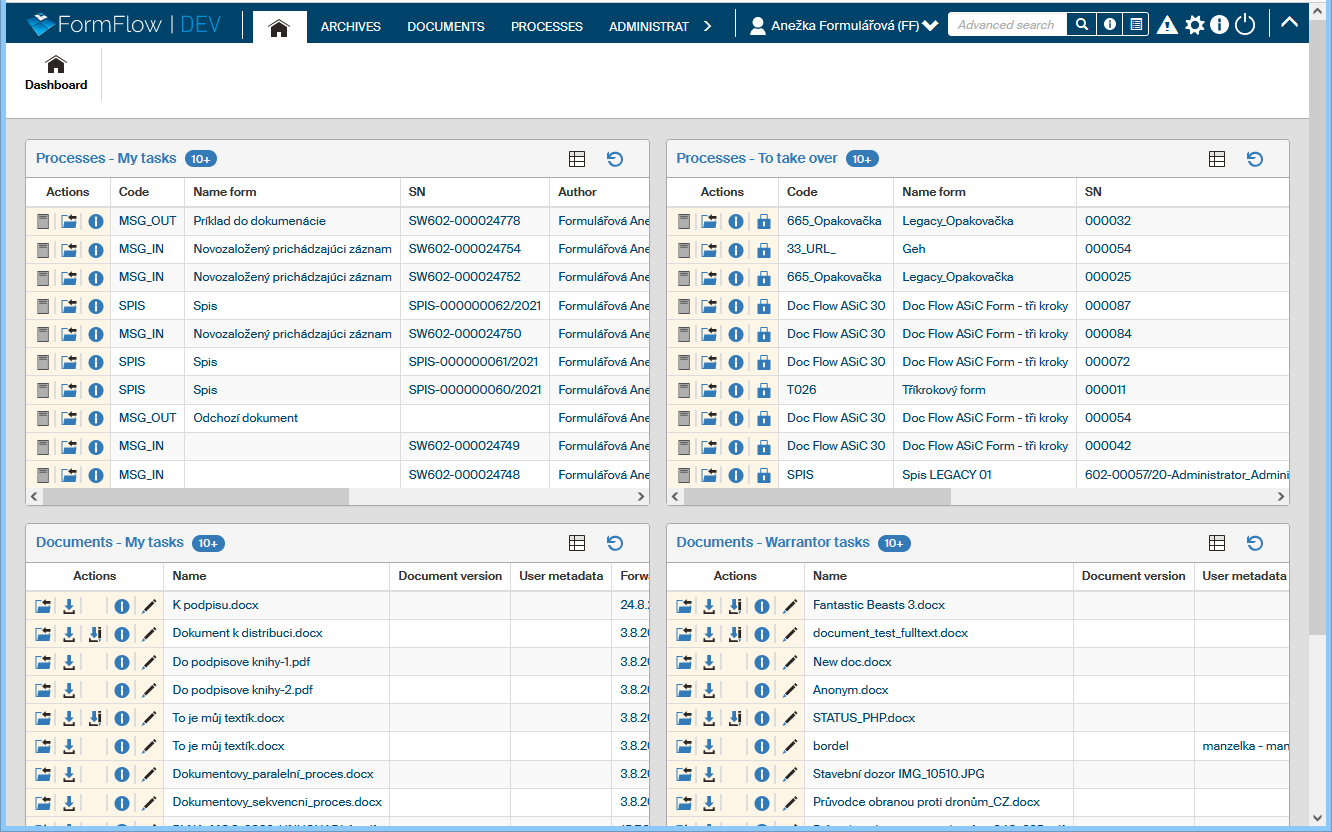
The DASHBOARD tab, symbolized by the house icon  , combines several useful overviews from FormFlow on a single page. For example, it displays documents and processes waiting for you to process them.

Click the Dashboard button on this tab to display the screen, which consists of several panels.
Each of them contains a table with one kind of data (for example Processes – to be processed by me). The Dashboard tables are organized in a way like the original overviews (for example, the Processes – to be processed by me table contains data ordered the same way as the data tables on the tab PROCESSES – to be processed by me).
There are several buttons in the header of each section (panel). In the default display mode, they are the following:
-
The button
 View more displays a table with data in the whole window.
 -
The button
 Refresh updates the contents of the section.

There are more controls available in the edit mode and administration mode (which is only available to selected users).
The default setting usually contains four panels with data overviews. Based on your permissions (set by the FormFlow administrator) or your own settings, either all or only some of them may be available to you. They are the following:
-
Documents – My tasks
-
Documents – Warrantor tasks
-
Processes – To be processed by me
-
Processes – To take over
Detailed description of the table columns and buttons in the Actions column are available in documentation for the specific overview. For Processes, it is chapter Form list, and Documents are described in chapter Document list.