External systems
External systems specify the originator for the document placed in the archive. To FormFlow, the Records management service is an external system, created automatically by the system. If e.g. a web service is used to place an item in the archive, they must select from which external system the document comes.
Open the screen External systems for the Archive by going to .
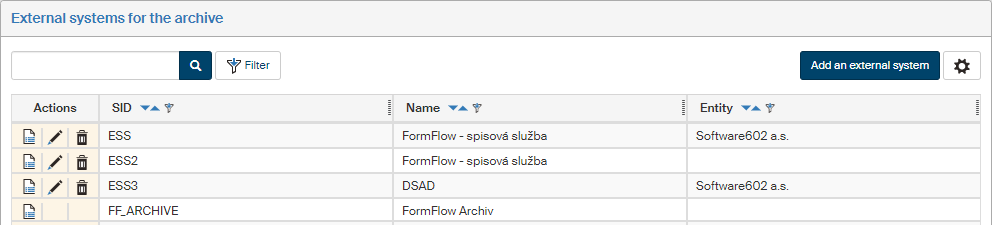
Administration of external system details
There are several buttons in the Actions column to edit external system details.
-
 Processing methods – open the Processing methods for … screen where you can set up the list of all available processing methods for the archived object.
 -
 Edit – displays a dialog window to edit the external system identification details. For more details, see chapter Adding an external system.
 -
 Delete – removes the external system entry. The button is not available for the default external systems, because they cannot be deleted.
Adding an external system
Click Add an external system in the upper right corner of the External system for the archive screen. The button opens the dialog Add a new external system. Enter the identification details (all three are mandatory).
-
SID – enter the unique system identifier.
-
Name – this system name will be displayed in lists.
-
Entity – select an entity from the list; the external system will be assigned to this entity.
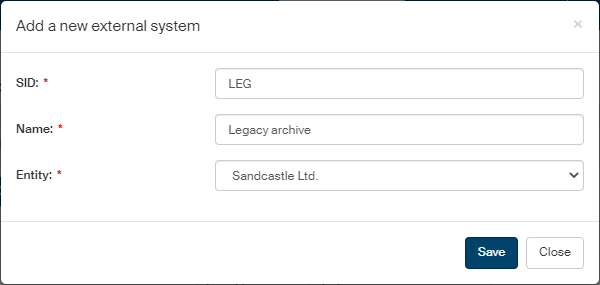
Click Save to confirm the new external system settings. A message in a green frame will confirm the creation.
Processing methods
Click Processing methods in the Actions column to open the dialog Processing methods for the external system…, where you can set up the list of all available processing methods for the archived object. Add or remove items as needed.
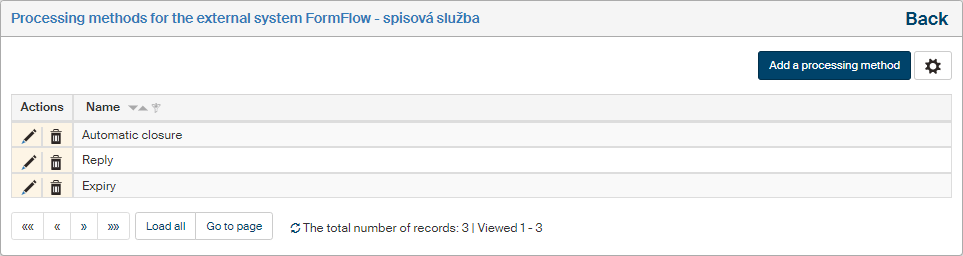
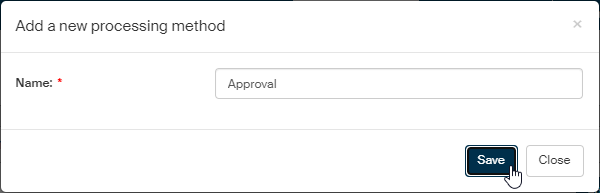
To add a new item, click Add a processing method to display the dialog Add a new processing method. Enter a name for the new item in the Name field. Then click Save to add the new item in the processing method list.
To rename an entry, go to the Actions column and click Edit. A dialog with the Name field is displayed. Edit the name.
To remove an item from the list, go to the Actions column and click the Delete icon. The item is then removed.