Reference number
By law, a document kept in a record must have a reference number. The reference number always contains the originator name or abbreviation, order number and a time period, which is usually the calendar year, and can also contain the name or abbreviation of its organizational unit and/or other characters marking facts relevant to the document.
Set up the reference number format for documents and their replies in the corresponding section. There are several macro examples available directly in the edit dialog.
On the left panel in the Entities screen (), make sure the entity you want to edit is selected in the Entities list. Then go to Menu and click Reference number. The screen Reference number (entity name) is displayed on the right.
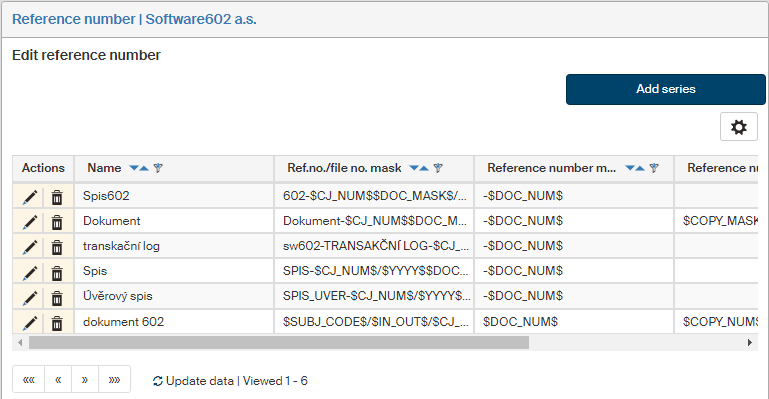
Creating a reference number
Click Add series in the upper right corner to open the Add series dialog.
The dialog lists individual setting items; click the blue “i” icon to display information on macros you can use to create the mask.
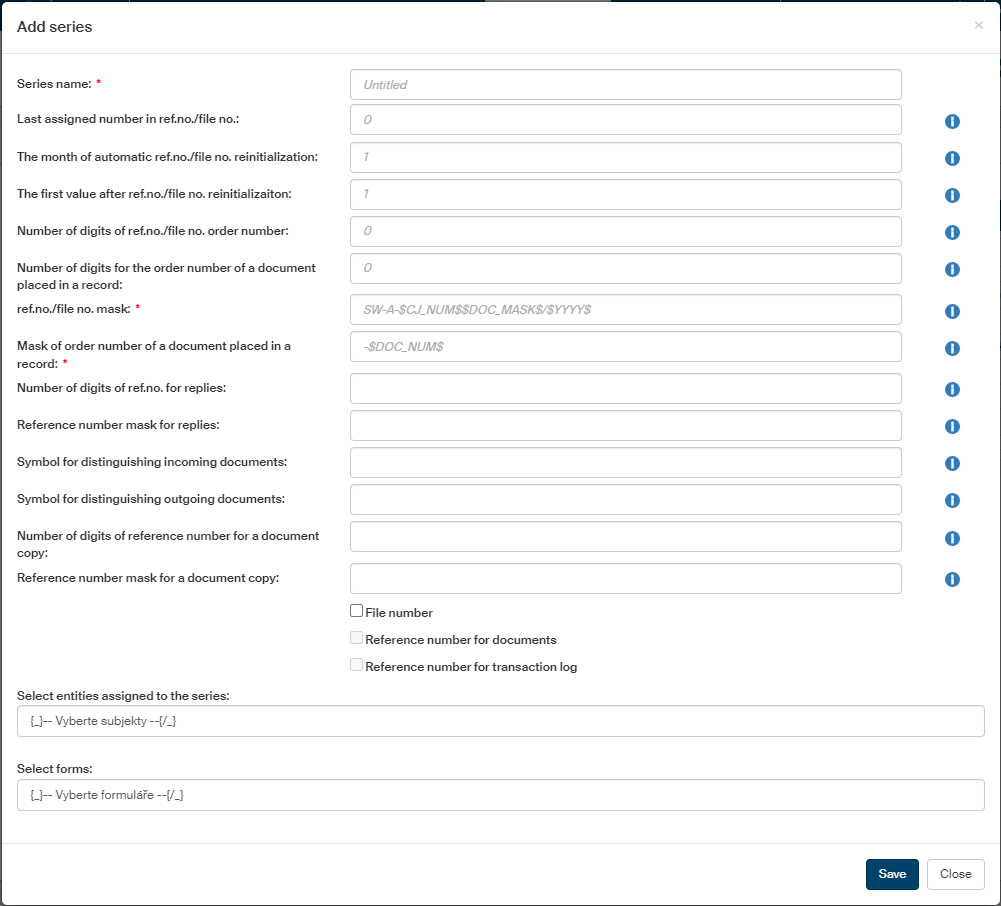
The setting items have the following meaning:
-
Series name – this name will be displayed on the lists when selecting a series.
-
Last assigned number in ref.no./file no. – displays the latest order number used in a process. The default value set after Records management installation is 0.
-
The month of automatic ref.no./file no. reinitialization – you can set to 1 to reset the order numbers in January, or to 0 to disable resetting.
-
The first value after ref.no./file no. reinitialization – the first value used after reset.
-
Number of digits of ref.no./file no. order number – number of digits of the resulting order number. Leading zeros will be added to lower numbers to reach the required number of digits.
-
Number of digits for the order number of a document placed in a record – number of digits of the resulting order number for a document. Leading zeros will be added to lower numbers to reach the required number of digits.
-
Ref.no./file no. mask – specifies how to compose the identification string to be used in forms. The mask must contain the $CJ_NUM$ and $DOC_MASK$ macros, i.e. the ref.no./file no. order number and the order number of a document placed in the record. An example mask: $SUBJ_CODE$/$IN_OUT$/$CJ_NUMDOC_MASK$/$YYYY$, $SUBJ_CODE$/$ORG_UNIT$/$USER_SURNAME$_$USER_ROLE$/$CJ_NUMDOC_MASK$/$YYYY$, $SUBJ_CODE$/$USER_SURNAME$/$CJ_NUMDOC_MASK$/$YYYYCOPY_MASK$.
The mask can contain the following macros:
-
$CJ_NUM$ = ref.no./file no. order number with leading zeros
-
$DOC_MASK$ = order number of a document placed in a file with leading zeros
-
$SUBJ_CODE$ = entity ID
-
$ORG_UNIT$ = code of the organizational unit where the user creating the ref.no./file no. belongs
-
$YYYY$ = long number of the current year
-
$YY$ = short number of current year
-
$DD$ = current day number
-
$MM$ = current month number
-
$USER_FIRSTNAME$ = first name of the user creating the ref.no./file no.
-
$USER_SURNAME$ = surname of the user creating the ref.no./file no.
-
$USER_ROLE$ = role of the user creating the ref.no./file no.
-
$UID$ = UID identification of the user creating the ref.no./file no.
-
$IN_OUT$ = identification of incoming or outgoing document
-
$COPY_MASK$ = order number of document copy
-
-
Mask for the order number of a document inserted in the record – indicates the position of the document in the record. It must only contain the $DOC_NUM$ macro with any additional text but cannot be combined with other macros. Example: Document no.: $DOC_NUM$.
-
Number of digits of ref.no. for replies – specifies the number of digits for the resulting reference number – leading zeros will be added to lower number to reach the required number of digits.
-
Reference number mask for replies – specifies how to compose the reference number string displayed in the Outgoing document form created as a reply to an Incoming document. The mask must contain the $CJ$ macro, which is the complete ref.no./file no. mask, and the $CJ_NUM_ANSWER$; it can be combined with other macros. An example reply mask: $CJ$_reply no:$CJ_NUM_ANSWER$.
-
Symbol for distinguishing incoming documents and Symbol for distinguishing outgoing documents – strings to use in the mask to indicate which of the two document types it is. Place the distinguishing symbol macro ($IN_OUT$) in the mask, and it will be replaced by one of these two strings based on the document type.
-
Number of digits of reference number for a document copy – specifies the number of digits for the resulting reference number – leading zeros will be added to lower number to reach the required number of digits.
-
Reference number mask for a document copy – specifies how to compose the reference number string. The mask must contain the $COPY_MASK$ macro that indicates the copy order number. An example mask:
copy no.:$COPY_MASK$.
Each field is followed by a help: click the  icon to display it.
When you have filled in the fields, click Save to confirm them.
Editing the reference number
Use the buttons in the Actions column to manage the reference number entries:
-
Click
 Edit ref.no. to display the edit dialog (it is identical to the one described in the previous chapter).
 -
Click
 Delete ref.no. to remove the series entry.
 -
Change the order of rows using the arrows in the Change order column.