External authentication and other login methods
External authentication is authentication using another, external system. Currently supported is authentication using 602ID, JIP/KAAS, SAML, Google ID, Microsoft Entra ID and Directory. Configure the individual types in window External authentication ().
General settings
The General settings tab contains the common parameters for all types of external authentication.
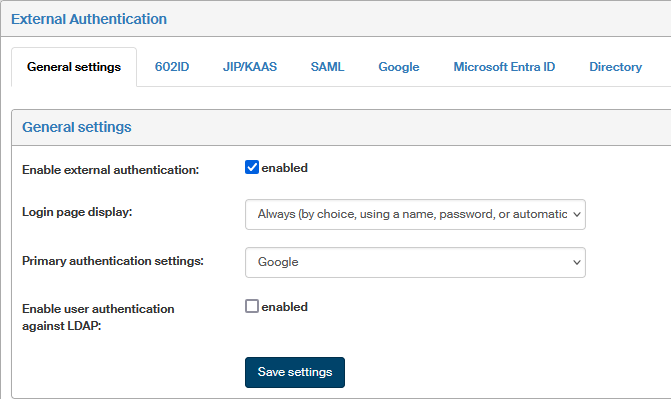
-
Enable external authentication – use the checkbox to enable or disable the option to use external authentication as a whole.
-
Login page display – use this option to set whether the login page to FormFlow will be displayed.
-
Never – the page will not be displayed and users will be logged in using automatic authentication.
-
Always – the login page will be displayed every time. You can select the login method there.
-
After logout, or in the case of failed login attempt – when accessing FormFlow normally, automatic authentication is used. The login page is displayed directly after a manual or forced (e.g. by a long inactivity) logout, or when an attempt to log in was unsuccessful.
-
-
Primary authentication settings – select which of the external authentications will be used for automatic authentication. The list will only offer methods set to enabled.
-
Enable user authentication against LDAP – the FormFlow login page is displayed to users, but they will be authenticated using LDAP. The option Synchronization with Directory must be enabled in the user’s settings and the user must be synchronized. It can only be used for synchronization against Active Directory, or another synchronization.
Save the options by clicking Save settings.
Creating and setting up the config.local.neon file
To use an authentication method correctly also in WS or FormFlow Office Extension, the following changes must be made.
Create file config.local.neon in folder \htdocs\configs\DI\ with the following lines:
ws_authenticator: FS\Auth\WindowsBasicAuthenticator
msoffice_authenticator: FS\Auth\WindowsBasicAuthenticator
ws_service_602_ltv_authenticator: FS\Auth\WindowsBasicAuthenticator
The authentication method is defined by one of the classes in php files in folder \htdocs\FS\Auth\.
They are the following:
| Class | Description |
|---|---|
WindowsNTLMAuthenticator |
Windows domain authentication |
WindowsBasicAuthenticator |
Authentication using a name and a password with verification against a Windows server (local or in a domain) |
SystemAccountConstantAuthenticator |
Helper class for authentication in ws calling directly without http, or for debugging |
LdapBasicAuthenticator |
Authentication using a name and a password against an LDAP server |
BasicAuthenticator |
Authentication using a name and a password against the FormFlow database |
For examples of these settings, see chapter Authentication configuration examples for FormFlow Office Extension.