Setting up status.php page to monitor FormFlow operation
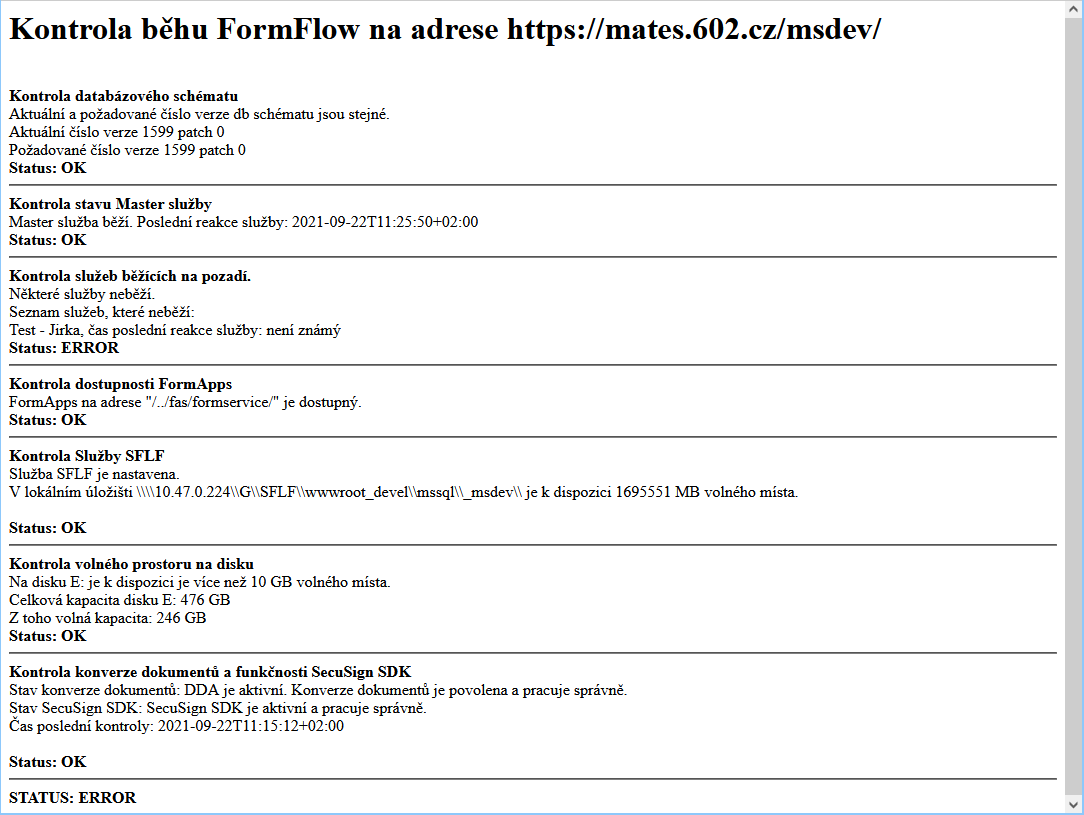
Open the status page at WEB_ROOT/status.php to check the operation of FormFlow components and display their results, as well as a general status monitored by the Nagios system.
The complete FormFlow status data is only displayed to a special “nagios” user, whose access password is generated as described in Setting up access details.
If an error state is encountered, the status.php page displays the issue details and sends a notification to the preset e-mail address.
| The status page is only available in Czech language. |
Setting up access details
Status page status.php, monitored by Nagios, is basic authenticated. The username is always “nagios”, the password is set differently for each FormFlow installation, and it is saved in the FormFlow database in encrypted form.
To set up the password (or change it later), use the following script utils\set_nagios_pass.php. Usage is as follows:
php set_nagios_pass.php [password length]
The [password length] parameter is optional.
If not set, the generated password will be 32 characters long.
You can choose to generate a password 16–128 characters long.
If you set the length lower than 16 characters, the generated password will be 16 characters long.
If you set the length higher than 128 characters, the generated password will be the maximum allowed length of 128 characters.
Since 15.7.2021, for easier use, the password is generated with alphanumerical characters only.
When generated, the password is encrypted and saved in the database, and displayed to the user in unencrypted form. It is recommended to store this displayed password safely. When you close the console window, it is not possible to display the password again. If needed, you can repeat the procedure to generate a new password.
Enabling / disabling individual checks
All implemented checks are enabled by default and their result is displayed after successful authentication on the status page, status.php. Use the parameters in htdocs\config.php to disable selected checks – set the corresponding parameter to false.
Examples:
-
Disable database schema check:
define('XMLGW_STP_CHECK_DB_SCHEMA', false); -
Disable the check whether the master service is running:
define('XMLGW_STP_CHECK_MASTER_SERVICE', false); -
Disable the check whether child services to the master service are running:
define('XMLGW_STP_CHECK_SERVICES', false); -
Disable certificate check:
define('XMLGW_STP_CHECK_CERTIFICATES', false); -
Disable FAS check:
define('XMLGW_STP_CHECK_FAS', false); -
Disable SFLF check:
define('XMLGW_STP_CHECK_SFLF', false); -
Disable data mailbox check:
define('XMLGW_STP_CHECK_DS', false); -
Disable storage space check:
define('XMLGW_STP_CHECK_DISC_SPACE', false); -
Disable the check whether web services (document conversion and SecuSign ws) are running:
define('XMLGW_STP_CHECK_WS', false);
All these parameters are set to true by default, if not set otherwise in config.php, therefore all checks are enabled by default.
Changed as of 15.7.2021 – storage space is monitored on all drives used by FormFlow. It is now possible to set the storage space level for warning and error messages. By default, the WARNING status is set if there is less than 10 GB space left on one of the drives. If there is less than 5 GB left, the ERROR status is set. The levels can be adjusted using the following configuration parameters:
-
WARNING level (in GB):
define('XMLGW_STP_DISC_SPACE_LEVEL_WARNING', 50); -
ERROR level (in GB):
define('XMLGW_STP_DISC_SPACE_LEVEL_WARNING', 20);
Setting up a notification e-mail address – for debugging
If an error is found when checking document conversion and SecuSign SDK operation, a notification is automatically sent to the FormFlow administrator e-mail address. For debugging and testing purposes, a test e-mail address can be set up in config.php. If this address is set, error notifications are sent to this address only and not to FormFlow administrators. When debugging and testing is over, it is recommended to delete this parameter from config.php – notifications will be sent to the e-mail addresses of all FormFlow administrators again.
An example setting of a testing e-mail address for conversion and SecuSign SDK error notifications:
define('XMLGW_WS_CHECKER_DEBUG_NOTIF_MAIL_ADDRESS', an+address@602.cz');