Datasets
A dataset is a set of contact details kept for a common specific purpose. Open the Datasets screen () to set up dataset properties, including the contact details included in each dataset.
Creating a new dataset
To create a new dataset, click the New dataset button on the right.

The button displays a simple dialog with a field to enter the new dataset name.
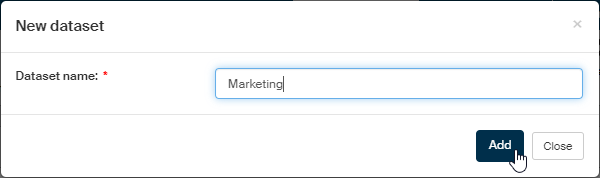
Click Add to confirm the dialog and an empty dataset detail table is displayed. You can start adding entries in it.
Inserting dataset entries
Click + Add personal detail next to the dataset name to open a dialog where you can set up the properties for a recorded personal detail.

Select a personal detail (from the basic data or contact information categories) in the Metadatum field. Then select one or more purposes for storing the personal detail in the Purpose field.
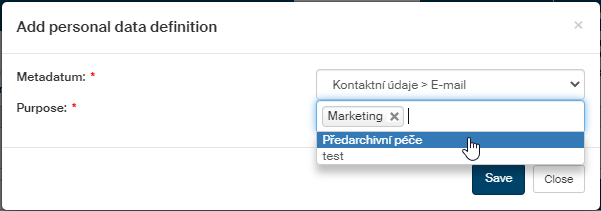
Click Save to confirm the settings.
Dataset list
In the Datasets screen, select a dataset to display in the list in the upper left corner. A table of stored details (basic or contact information) is displayed. Each detail is listed on a separate row with at least one purpose given.
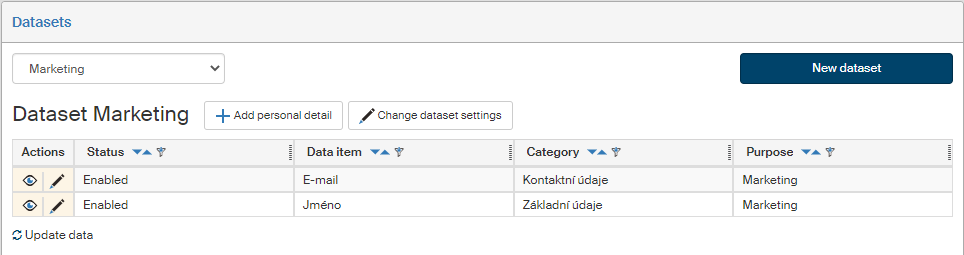
Use the buttons in the Actions column to edit the entries:
-
Click
 /
/  to enable or disable the entry (display or hide it).
 -
Click
 to display the entry edit dialog.
There are two more buttons available above the table:
-
Add personal detail – displays a dialog to insert a new detail to store (as described below).
-
Change dataset settings – displays a dialog to change dataset name, similar to the one when creating a new dataset.